
Why Google Is Not Indexing Your Pages: 15 Common Reasons & Proven Fixes (2026 Guide)
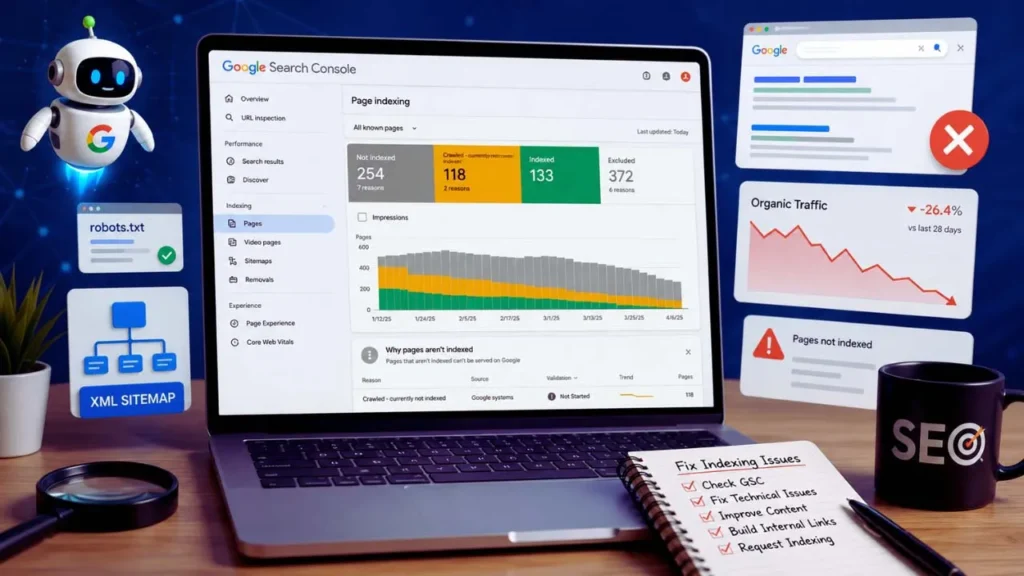
Introduction :
Getting your content published is exciting—but what if it never appears on Google Search? You spend hours researching, writing, optimizing, and hitting the publish button, only to discover that your page isn’t showing up anywhere. If you’ve been wondering why Google is not indexing your pages, you’re not alone. It’s one of the most common challenges website owners, bloggers, and digital marketers face, whether they’re running a brand-new blog or an established website.
Table of Contents
ToggleWhen a page isn’t indexed, it simply can’t rank in search results or attract organic traffic. In many cases, the issue isn’t your content but technical SEO problems, poor site structure, indexing restrictions, or signals that prevent Google from adding your page to its search index. The good news is that most indexing issues are identifiable and fixable once you know what to look for.
In this guide, you’ll learn the most common reasons Google refuses to index certain pages and, more importantly, how to fix each problem step by step. We’ll cover everything from Google Search Console reports and crawl errors to XML sitemaps, internal linking, duplicate content, and other technical factors that influence indexing. By the end of this article, you’ll have a clear action plan to improve your website’s visibility, help Google discover your content faster, and increase your chances of ranking in search results.
What Is the Main Reason Google Is Not Indexing Your Pages?
Google may not index your pages due to low-quality or duplicate content, noindex tags, robots.txt restrictions, poor internal linking, missing XML sitemaps, server errors, or other technical SEO issues. Use Google Search Console to identify the exact cause and fix it before requesting indexing.
What Does Google Indexing Mean?
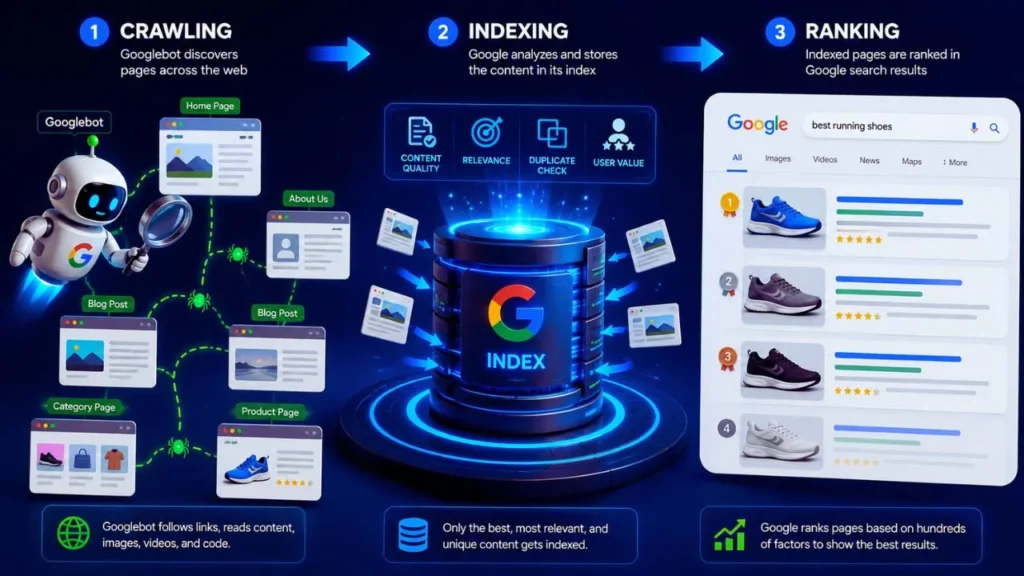
If you want your website to appear in Google Search, understanding Google indexing is essential. Many website owners assume that publishing a page automatically makes it searchable, but that’s not how Google works. Before your content can rank for any keyword, Google must first discover, analyze, and store it in its search index.
Think of Google’s index as a massive digital library. Every webpage Google decides is valuable is added to this library. When someone searches for information, Google doesn’t search the entire internet in real time—it searches its index. If your page isn’t in that index, it has virtually no chance of appearing in search results, regardless of how well-written or optimized it is.
Google indexing involves three key stages: crawling, indexing, and ranking. Each stage serves a different purpose, and understanding the difference can help you diagnose why your pages aren’t showing up in Google Search.
Crawling vs. Indexing vs. Ranking
Although these terms are often used interchangeably, they describe different parts of Google’s search process.
Crawling
Crawling is the first step. Google uses automated bots, known as Googlebot, to discover new and updated pages across the web. These bots follow links from existing pages, XML sitemaps, and other sources to find content.
For example, if you publish a new blog post and link to it from your homepage, Googlebot can follow that link and crawl the page.
However, being crawled does not guarantee that the page will appear in Google Search.
Indexing
After crawling, Google analyzes the page to determine whether it’s useful, unique, and valuable enough to include in its search index.
During this process, Google evaluates factors such as:
- Content quality and originality
- Page relevance
- Duplicate content
- Meta tags (including noindex)
- Canonical tags
- Technical SEO issues
If the page meets Google’s quality standards, it is added to the index. Otherwise, Google may exclude it, even though it has already crawled the page.
Example:
Suppose you publish two articles covering nearly identical information. Google may index only one version while excluding the other as duplicate content.
For a deeper understanding of how Google crawls, indexes, and ranks webpages, refer to the official Google Search Central documentation
Ranking
Ranking is the final stage.
Once a page has been indexed, Google determines where it should appear in search results for different queries. Ranking depends on hundreds of factors, including:
- Search intent
- Content quality
- Backlinks
- Website authority
- User experience
- Core Web Vitals
- Internal linking
- Freshness of content
An important point to remember is:
Every ranking page must be indexed, but not every indexed page will rank well.
For example, your article may be indexed within a few days but still appear on page five of the search results because stronger competitors have more authoritative content.
How Google Discovers New Pages
Google doesn’t automatically know when you’ve published new content. Instead, it discovers pages through multiple sources.
Internal Links
Internal links are one of the most effective ways to help Google discover new content.
For example, if you publish a new article about Technical SEO and link to it from your homepage or a related blog post, Googlebot can easily find and crawl the new page.
This is why orphan pages—pages with no internal links—often remain undiscovered for long periods.
XML Sitemap
An XML sitemap acts as a roadmap for your website. It lists important URLs that you want search engines to crawl and index.
Submitting your sitemap through Google Search Console helps Google identify newly published or updated pages more efficiently.
Although submitting a sitemap doesn’t guarantee indexing, it significantly improves content discovery.
Backlinks
When another trusted website links to your page, Google may discover your content through that backlink.
For instance, if a reputable SEO blog references one of your guides, Googlebot can follow that link to crawl your page.
High-quality backlinks not only help with discovery but also strengthen your website’s authority.
Google Search Console
The URL Inspection Tool in Google Search Console allows you to request indexing after publishing or updating a page.
While this feature doesn’t force Google to index your content immediately, it notifies Google that a page is available for review.
Website Navigation
A clean and logical site structure makes it easier for Google to discover all important pages.
For example, organizing content into categories such as SEO, Blogging, AI Tools, and Affiliate Marketing ensures Google can efficiently crawl your website without missing valuable pages.
Why Indexed Pages Matter for SEO
Indexing is the foundation of every successful SEO strategy. Without indexing, your content is invisible to Google Search, meaning it cannot generate organic traffic, leads, or conversions.
Here are the biggest reasons why indexing matters:
- Visibility in search results: Only indexed pages are eligible to appear on Google Search.
- Organic traffic: If a page isn’t indexed, users can’t find it through search engines.
- Keyword rankings: Google can rank only pages that exist in its index.
- Business growth: Indexed pages attract visitors who are actively searching for your products, services, or information.
- Faster content discovery: A properly indexed website helps Google find and evaluate future content more efficiently.
Imagine you’ve written a comprehensive guide on affiliate marketing. Even if it’s more helpful than competing articles, it won’t receive any search traffic until Google indexes it.
That’s why checking your indexing status should be one of the first troubleshooting steps whenever a page fails to rank.
Understanding how crawling, indexing, and ranking work gives you a solid foundation for solving indexing problems. Once you know where the process breaks down, you can take targeted action to help Google discover, index, and eventually rank your content more effectively and take the right actions to improve your website’s visibility in Google Search..
Expert Tip
Don’t make the mistake of requesting indexing immediately after publishing every new page. Instead, ensure the page is fully optimized first. Check that it has high-quality original content, at least a few relevant internal links, a self-referencing canonical tag, and is included in your XML sitemap. Once everything is in place, use the URL Inspection Tool in Google Search Console to request indexing. This approach sends stronger quality signals to Google and reduces the chances of your page being classified as “Crawled – Currently Not Indexed.” Consistently publishing helpful, well-structured content is one of the most effective long-term indexing strategies.
How to Check If Google Has Indexed Your Page
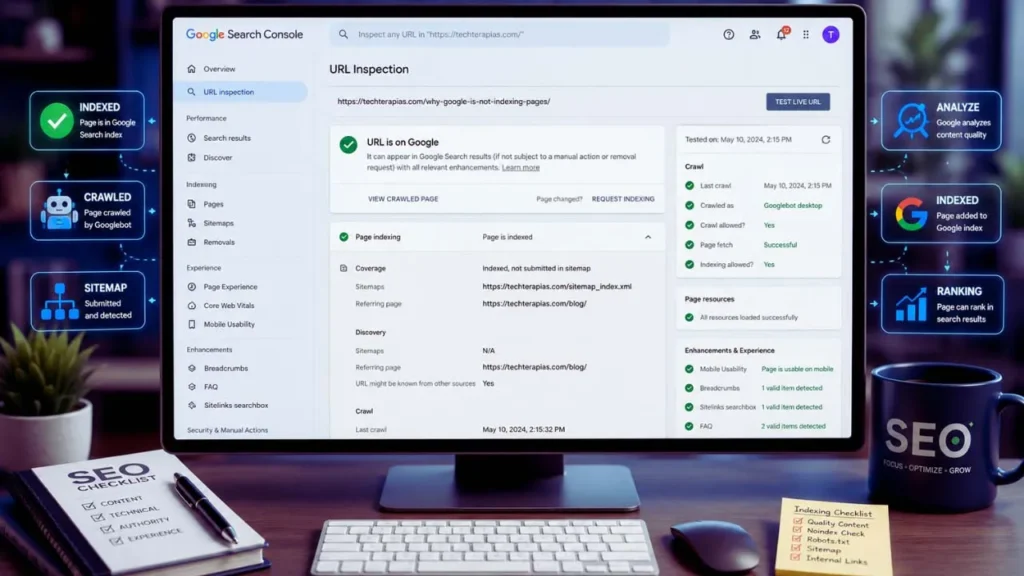
Before trying to fix an indexing problem, you need to confirm whether your page is actually indexed. Many website owners assume a page isn’t indexed simply because it isn’t ranking, but that’s not always the case. A page may be indexed yet rank poorly, or it may not be indexed at all.
Fortunately, Google provides several reliable ways to verify a page’s indexing status. Using these methods can help you identify the issue and choose the right solution.
Use Google Search (site: Operator)
The quickest way to check whether a page is indexed is by using Google’s site: search operator.
In the Google search bar, type:
site:yourdomain.com/page-urlFor example:
site:techterapias.com/why-google-is-not-indexing-your-pagesHow to interpret the results
- The page appears in search results: Google has indexed the page.
- No results are found: The page is likely not indexed, although newly published pages may still be waiting to be crawled.
You can also search using:
site:yourdomain.com "page title"This method is useful if you’re unsure of the exact URL.
Limitations:
The site: operator is a quick check, but it isn’t always 100% accurate. Google itself states that the results are approximate. For a definitive answer, use Google Search Console.
Check with Google Search Console
Google Search Console is the most reliable tool for monitoring your website’s indexing status. It provides direct information from Google about which pages are indexed, excluded, or experiencing technical issues.
To check a page:
- Sign in to Google Search Console.
- Select your website property.
- Navigate to Indexing → Pages.
- Review the indexing summary and status reports.
Here you’ll see categories such as:
- Indexed
- Crawled – Currently Not Indexed
- Discovered – Currently Not Indexed
- Excluded by “Noindex”
- Blocked by robots.txt
- Duplicate without user-selected canonical
- Soft 404
These reports help you identify exactly why Google isn’t indexing a specific page instead of leaving you to guess.
Example:
If your article appears under “Crawled – Currently Not Indexed,” Google has visited the page but decided not to include it in its search index, often because of quality or duplication concerns.
Use the URL Inspection Tool
The URL Inspection Tool is one of the most valuable features in Google Search Console. It lets you inspect an individual page and see exactly how Google views it.
To use it:
- Open Google Search Console.
- Paste the full page URL into the search bar at the top.
- Press Enter.
- Wait for the inspection results.
If you’re unsure why a page isn’t indexed, Google’s official URL Inspection Tool documentation explains how to inspect URLs, identify indexing issues, and request reindexing.
The tool provides useful information, including:
- Whether the page is indexed
- The last crawl date
- Crawl status
- Canonical URL
- Mobile usability
- Whether indexing is allowed
- Any detected crawl or indexing issues
If the page isn’t indexed, Google often provides a reason.
After fixing any problems, click Request Indexing to ask Google to recrawl the page. While this doesn’t guarantee immediate indexing, it can speed up the review process for new or updated content.
Understand the Page Indexing Report
The Page Indexing Report gives you a complete overview of your website’s indexing health. Instead of checking one page at a time, it helps you identify patterns affecting multiple URLs.
Some of the most common indexing statuses include:
Indexed
This is the ideal status. It means Google has successfully indexed the page, making it eligible to appear in search results.
Crawled – Currently Not Indexed
Google has crawled the page but decided not to index it at this time. Common reasons include:
- Thin or low-value content
- Duplicate information
- Weak internal linking
- Insufficient quality signals
Discovered – Currently Not Indexed
Google knows the page exists but hasn’t crawled it yet. This often happens with:
- New websites
- Large websites with many URLs
- Limited crawl budget
- Poor internal linking
Excluded by “Noindex”
The page contains a noindex directive, instructing Google not to include it in search results.
Blocked by robots.txt
Google cannot crawl the page because your robots.txt file is blocking access.
Duplicate Without User-Selected Canonical
Google found multiple versions of similar content and selected a different URL as the canonical version.
Soft 404
The page exists technically but appears to provide little or no useful content, causing Google to treat it as a “soft” error instead of a valid page.
Regularly reviewing the Page Indexing Report helps you detect issues before they impact your organic traffic. For most websites, checking Google Search Console at least once a week is a good habit. By monitoring indexing status consistently, you can identify problems early, fix them quickly, and ensure your most important pages remain visible in Google Search.
Why Google Is Not Indexing Your Pages (15 Common Reasons)
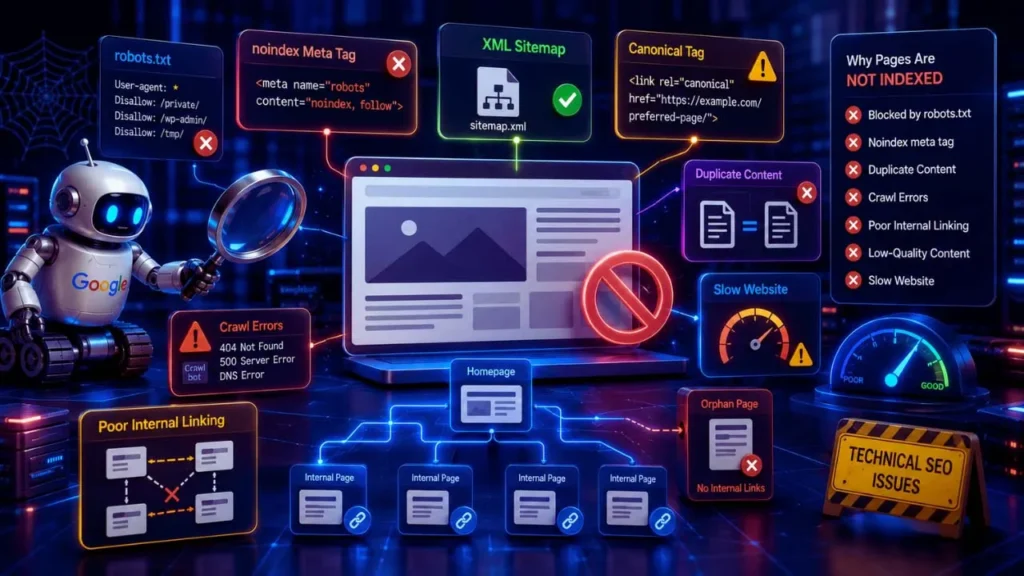
If your page isn’t appearing in Google Search, don’t panic. In most cases, the problem can be traced back to one or more technical, content-related, or quality issues. Below are the 15 most common reasons Google may not index your pages and the practical steps you can take to fix them.
1. Your Page Is Too New
One of the simplest reasons your page isn’t indexed is that Google hasn’t had enough time to discover and process it.
For new websites with little authority, indexing may take several days or even weeks. Established websites with frequent updates are usually crawled much faster.
Typical indexing timeline:
- Established websites: A few hours to 3 days
- Medium-authority websites: 3–10 days
- Brand-new websites: 1–4 weeks (sometimes longer)
How to speed it up:
- Submit the URL in Google Search Console.
- Add internal links from existing pages.
- Include the page in your XML sitemap.
- Share the page on trusted platforms to increase discovery.
2. Noindex Meta Tag Is Blocking the Page
A noindex meta tag tells Google not to include a page in its search index.
Example:
<meta name="robots" content="noindex">Sometimes this tag is added accidentally by a CMS, SEO plugin, or during website development.
How to identify it:
- Inspect the page source.
- Use the URL Inspection Tool in Google Search Console.
- Check your SEO plugin settings.
If your page should appear in search results, make sure it isn’t blocked by a noindex directive, following Google’s official implementation guidelines.
How to fix it:
- Remove the noindex directive.
- Save the changes.
- Request indexing through Google Search Console.
3. Robots.txt Is Preventing Crawling
Your robots.txt file controls which parts of your website search engine bots can crawl.
A common mistake is accidentally blocking important pages.
Example:
User-agent: *
Disallow: /
This directive blocks Google from crawling your entire website.
How to fix it:
- Review your robots.txt file.
- Remove unnecessary Disallow rules.
- Test the affected URL using Google Search Console.
4. The Page Is Not Included in Your XML Sitemap
An XML sitemap helps Google discover important pages more efficiently.
Although pages can be indexed without a sitemap, including them improves crawl efficiency, especially for large websites.
Best practices:
- Include only indexable URLs.
- Remove broken or redirected pages.
- Update the sitemap automatically.
- Submit the sitemap in Google Search Console after major updates.
5. Poor Internal Linking
Google discovers many pages by following internal links. If no other page links to your new content, Google may never find it quickly.
Pages with no internal links are called orphan pages.
Example:
Publishing a new article without linking it from your homepage, category page, or related posts.
How to improve internal linking:
- Link from relevant existing articles.
- Add new content to category pages.
- Use descriptive anchor text.
- Build topic clusters around related content.
6. Low-Quality or Thin Content
Google prioritizes content that is original, helpful, and comprehensive.
Pages with very little information or copied content may be crawled but not indexed.
Examples of thin content include:
- 150-word articles
- AI-generated text without editing
- Duplicate product descriptions
- Empty category pages
How to improve content:
- Cover the topic in depth.
- Add examples and practical advice.
- Include original insights and real experience.
- Update outdated information regularly.
7. Duplicate Content Issues
When Google finds multiple pages containing nearly identical content, it usually indexes only one version.
Common causes include:
- URL parameters
- HTTP and HTTPS versions
- WWW and non-WWW versions
- Similar blog posts targeting the same keyword
Use canonical tags to indicate the preferred version.
Best practice:
Each important page should have a self-referencing canonical tag unless another version is intentionally preferred.
8. Crawled – Currently Not Indexed
This status means Google successfully crawled the page but decided not to add it to its index.
Common reasons include:
- Weak content quality
- Duplicate information
- Poor user value
- Low authority
Proven fixes:
- Expand and improve the content.
- Add relevant internal links.
- Strengthen topical authority.
- Request indexing after making improvements.
9. Discovered – Currently Not Indexed
Google knows the page exists but hasn’t crawled it yet.
Possible causes:
- Large websites with many URLs
- Limited crawl budget
- Weak internal linking
- Low-priority pages
Solutions:
- Improve site navigation.
- Add internal links.
- Update your XML sitemap.
- Remove unnecessary low-value pages.
10. Slow Website Performance
A slow website can reduce Google’s crawl efficiency.
If Googlebot spends too much time loading pages, it may crawl fewer URLs during each visit.
Focus on improving:
- Page speed
- Server response time
- Image optimization
- Core Web Vitals
- Mobile performance
Fast websites are generally crawled and indexed more efficiently.
11. Server Errors (5xx)
If your server repeatedly returns 500, 502, 503, or 504 errors, Google may stop crawling affected pages.
Common causes include:
- Hosting downtime
- PHP errors
- Database failures
- Server overload
How to diagnose:
- Check your hosting logs.
- Use Google Search Console reports.
- Monitor uptime regularly.
- Fix server issues before requesting reindexing.
12. Incorrect Canonical Tags
Canonical tags tell Google which version of a page should be indexed.
Incorrect implementation can accidentally prevent the intended page from appearing in search results.
Common mistakes:
- Pointing to the wrong URL
- Canonicalizing every page to the homepage
- Using conflicting canonical signals
Best practice:
Review canonical tags carefully and ensure they reference the correct preferred URL.
13. Manual Actions or Security Issues
Google may exclude pages if your website violates its spam policies or poses security risks.
Common problems include:
- Spam content
- Hidden text
- Keyword stuffing
- Hacked pages
- Malware infections
Check the Security & Manual Actions section in Google Search Console and resolve any reported issues immediately.
14. Weak Backlink and Authority Signals
Google is more likely to trust websites that demonstrate authority and credibility.
If your site has very few quality backlinks, Google may crawl pages less frequently and take longer to index new content.
How to build authority:
- Publish helpful, original content.
- Earn backlinks from reputable websites.
- Build topical authority around your niche.
- Keep content updated and accurate.
15. Crawl Budget Issues (Large Websites)
Crawl budget refers to the number of pages Googlebot is willing to crawl on your website within a given period.
For most small and medium-sized websites, crawl budget isn’t a concern. However, it becomes important for websites with thousands of URLs.
You may waste crawl budget if your site contains:
- Duplicate pages
- Filter URLs
- Infinite parameter combinations
- Broken links
- Redirect chains
How to optimize crawl budget:
- Remove unnecessary URLs.
- Fix broken links.
- Keep your XML sitemap clean.
- Strengthen internal linking.
- Prevent duplicate content.
By understanding these 15 common indexing problems and addressing them systematically, you can significantly improve your chances of getting pages indexed faster and increasing your website’s visibility in Google Search.
How to Fix Google Indexing Issues Step by Step
Discovering that Google isn’t indexing your pages can be frustrating, but the solution is often straightforward. Instead of guessing what’s wrong, follow a systematic approach to identify and fix the issue. The seven steps below cover the most common indexing problems and help improve your chances of getting your pages indexed faster.
Step 1: Inspect the URL
The first step is to determine exactly how Google sees your page.
Open Google Search Console, paste the page URL into the URL Inspection Tool, and review the results.
Pay close attention to:
- Whether the page is indexed
- The last crawl date
- Crawl status
- Canonical URL
- Mobile usability
- Any reported indexing issues
When a page isn’t appearing in Google Search, follow Google’s official guide to troubleshoot indexing issues using the URL Inspection Tool before requesting indexing again.
If Google reports messages such as “Crawled – Currently Not Indexed”, “Discovered – Currently Not Indexed”, or “Blocked by robots.txt”, you’ll know where to focus your efforts.
Pro Tip: Never request indexing before understanding the underlying issue. Fix the problem first, then ask Google to recrawl the page.
Step 2: Remove Indexing Blocks
A page cannot be indexed if Google is instructed not to crawl or index it.
Check for common blocking issues, including:
- Noindex meta tags
- Robots.txt restrictions
- Incorrect canonical tags
- Password-protected pages
- Redirect loops
- Broken URLs (404 errors)
For example, a page containing:
<meta name="robots" content="noindex">will never appear in Google Search until the noindex directive is removed.
After fixing these issues, test the page again using the URL Inspection Tool to confirm that indexing is now allowed.
Step 3: Improve Content Quality
Google aims to index content that provides genuine value to users. If your page is thin, outdated, or largely duplicated from other sources, it may be crawled but excluded from the index.
Before requesting indexing, ask yourself:
- Does this page fully answer the user’s question?
- Is the content original?
- Does it offer unique insights or practical examples?
- Is it more useful than competing pages?
Ways to improve quality include:
- Expand shallow content with detailed explanations.
- Add screenshots, examples, or case studies.
- Include original data or personal experience where appropriate.
- Improve readability using headings, bullet points, and short paragraphs.
- Update outdated statistics and recommendations.
Remember, Google’s Helpful Content systems reward content written primarily for people—not just search engines.
Step 4: Strengthen Internal Links
Internal links help Google discover pages and understand the relationship between different topics on your website.
A page with no incoming internal links (an orphan page) is much harder for Googlebot to find.
To strengthen your internal linking:
- Link from high-authority pages on your website.
- Add the new page to relevant category pages.
- Connect related articles using descriptive anchor text.
- Build topical clusters around similar subjects.
Example:
If you publish an article titled “Why Google Is Not Indexing Your Pages,” link to it from related articles about:
- Technical SEO
- Google Search Console
- XML Sitemaps
- Crawl Errors
- Website Indexing
This helps Google understand your site’s structure and improves content discovery.
Step 5: Update XML Sitemap
Your XML sitemap acts as a roadmap for search engines.
Whenever you publish or significantly update a page, make sure it appears in your sitemap.
Best practices include:
- Include only important, indexable pages.
- Remove redirected and deleted URLs.
- Exclude pages marked as noindex.
- Regenerate the sitemap automatically whenever possible.
- Submit the updated sitemap through Google Search Console.
Although an XML sitemap doesn’t guarantee indexing, it helps Google discover content more efficiently.
Step 6: Request Indexing in Google Search Console
Once you’ve fixed any technical or content-related issues, you can ask Google to review the page.
To request indexing:
- Open Google Search Console.
- Use the URL Inspection Tool.
- Enter the page URL.
- Click Request Indexing.
Google will add the page to its crawl queue. Depending on your website’s authority and crawl frequency, indexing may occur within hours or take several days.
Keep in mind that repeatedly requesting indexing without making meaningful improvements is unlikely to speed up the process.
Step 7: Monitor the Page Indexing Report
Indexing isn’t a one-time task. Regular monitoring helps you identify new issues before they affect your search visibility.
In Google Search Console, review the Page Indexing Report periodically to look for statuses such as:
- Indexed
- Crawled – Currently Not Indexed
- Discovered – Currently Not Indexed
- Blocked by robots.txt
- Excluded by Noindex
- Duplicate without user-selected canonical
- Soft 404
If you notice a growing number of excluded pages, investigate the root cause rather than simply requesting indexing again.
Developing the habit of checking your indexing reports weekly can help you catch technical SEO problems early and keep your most valuable content visible in Google Search.
Following these seven steps creates a reliable workflow for resolving indexing issues. In most cases, improving content quality, removing technical barriers, strengthening internal links, and monitoring Google Search Console consistently will resolve the majority of indexing problems and increase your chances of achieving stable organic visibility.
How Long Does Google Take to Index a Page?
One of the most common questions website owners ask is, “How long does Google take to index a page?” Unfortunately, there isn’t a fixed answer. Google doesn’t guarantee an indexing timeline because every website is different. Factors such as your site’s authority, content quality, technical SEO, and crawl frequency all influence how quickly a page gets indexed.
Some pages are indexed within a few hours, while others can take several weeks. Understanding what affects indexing speed can help you set realistic expectations and take the right steps to speed up the process.
Average Indexing Time
Google can index a page anywhere from a few hours to several weeks.
Here’s a general guideline:
| Website Type | Typical Indexing Time |
|---|---|
| High-authority websites | A few hours to 3 days |
| Established blogs | 2–7 days |
| Small business websites | 1–2 weeks |
| Brand-new websites | 2–4 weeks or longer |
Keep in mind that these are estimates, not guarantees. Even if you submit a page through Google Search Console, Google ultimately decides when—or whether—to index it.
For example, if you publish a high-quality article on an established website that is crawled daily, it may appear in Google’s index within 24 hours. On the other hand, a newly launched website with few backlinks and limited content may wait several weeks before Google crawls its pages.
Factors That Affect Indexing Speed
Several factors influence how quickly Google discovers and indexes your content.
Website Authority
Trusted websites with a strong history of publishing helpful content are crawled more frequently. New websites usually have lower crawl priority, so indexing takes longer.
Content Quality
Google prefers content that is original, comprehensive, and useful. Thin, duplicate, or low-value pages are often delayed or excluded from indexing.
Internal Linking
Pages linked from your homepage, category pages, or related articles are easier for Googlebot to discover than orphan pages with no internal links.
XML Sitemap
A properly maintained XML sitemap helps Google find new pages faster, especially on larger websites.
Crawl Frequency
Some websites are visited by Googlebot multiple times a day, while others may only be crawled every few weeks. Sites that publish high-quality content regularly tend to receive more frequent crawls.
Technical SEO
Problems such as blocked robots.txt rules, incorrect canonical tags, server errors, slow page speed, or noindex directives can significantly delay indexing.
Backlinks
Quality backlinks from trusted websites can help Google discover new pages more quickly and improve your site’s overall authority.
Tips to Get Indexed Faster
Although you can’t force Google to index a page, you can make it easier for Googlebot to discover and evaluate your content.
Follow these best practices:
- Publish original, helpful, and comprehensive content.
- Add several relevant internal links from existing pages.
- Include the page in your XML sitemap.
- Remove any noindex directives or crawl blocks.
- Check that the canonical tag points to the correct URL.
- Use the URL Inspection Tool in Google Search Console and click Request Indexing after publishing.
- Improve website speed and Core Web Vitals.
- Share your content through trusted websites and social platforms to increase visibility.
- Earn high-quality backlinks over time.
- Monitor the Page Indexing Report regularly to identify and resolve issues quickly.
Expert Tip:
Don’t request indexing immediately after publishing a draft. Instead, make sure the article is complete, well-optimized, internally linked, and free of technical issues. Request indexing only after you’ve published the best possible version. This increases the likelihood that Google will index the page on its first review.
While it’s natural to want instant results, indexing is only the first step in Google’s search process. Focus on consistently publishing valuable content and maintaining a technically sound website. Over time, Google will crawl your site more frequently, helping new pages get indexed—and eventually ranked—much faster.
Best Practices to Ensure Faster Google Indexing
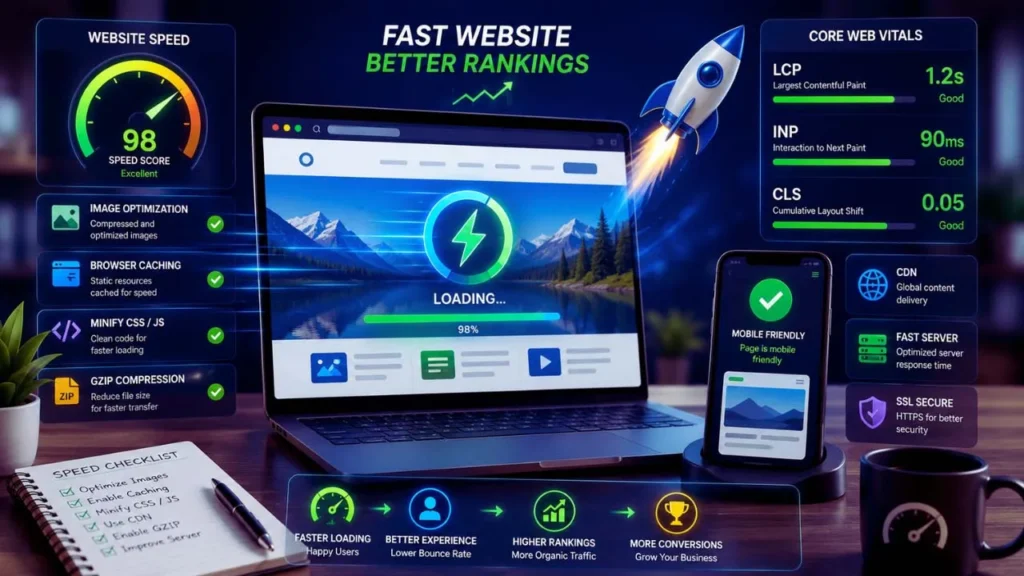
Although there’s no guaranteed way to force Google to index your pages instantly, following proven SEO best practices can significantly improve your chances of faster crawling and indexing. Google’s goal is to provide users with high-quality search results, so websites that consistently publish valuable content and maintain strong technical SEO are typically crawled more frequently.
The following best practices will help Google discover, evaluate, and index your pages more efficiently.
Publish Helpful, Original Content
Content quality is one of the strongest signals Google uses when deciding whether to index a page.
Instead of creating pages solely to target keywords, focus on solving real problems for your audience. Helpful content is more likely to be indexed, ranked, and revisited by Googlebot.
To create index-worthy content:
- Write comprehensive and original articles.
- Answer users’ search intent clearly.
- Include real examples, screenshots, or case studies.
- Update outdated content regularly.
- Demonstrate experience and expertise wherever possible.
Example:
A detailed 2,500-word guide explaining how to fix Google indexing issues is far more valuable than a short 300-word article that simply repeats common advice.
Maintain a Clean Site Structure
A well-organized website helps both users and search engines navigate your content.
Googlebot can crawl pages more efficiently when your site follows a logical hierarchy.
A good structure typically looks like this:
- Homepage
- Category
- Subcategory (if applicable)
- Article
- Subcategory (if applicable)
- Category
For example:
Homepage → SEO → Technical SEO → Why Google Is Not Indexing Your Pages
Also remember to:
- Use descriptive URLs.
- Create clear navigation menus.
- Add breadcrumb navigation.
- Avoid deep page structures that require many clicks to reach.
A clean architecture improves crawl efficiency and reduces the risk of important pages being overlooked.
Keep XML Sitemaps Updated
Your XML sitemap serves as a roadmap for Google.
Whenever you publish, update, or delete content, ensure your sitemap reflects those changes.
Best practices include:
- Include only indexable URLs.
- Remove deleted and redirected pages.
- Exclude pages marked with noindex.
- Generate the sitemap automatically using your CMS or SEO plugin.
- Resubmit the sitemap in Google Search Console after major website changes.
An accurate sitemap makes it easier for Google to discover new content, especially on websites with hundreds or thousands of pages.
Improve Internal Linking
Internal links help Googlebot discover pages while also distributing authority across your website.
Every important page should receive links from other relevant pages.
A strong internal linking strategy includes:
- Linking new articles from older, high-performing posts.
- Adding links to category and pillar pages.
- Using descriptive anchor text.
- Connecting related topics through content clusters.
- Eliminating orphan pages.
Example:
If you publish a guide about Google Indexing, link to it from articles covering:
- Technical SEO
- XML Sitemaps
- Google Search Console
- Crawl Errors
- Website SEO Audit
This helps Google understand the relationship between your content and improves indexing efficiency.
Optimize Website Speed
Website performance directly affects Google’s crawling efficiency.
Slow-loading websites require more server resources, which can reduce the number of pages Googlebot crawls during each visit.
To improve speed:
- Compress and properly size images.
- Enable browser caching.
- Minify CSS and JavaScript.
- Use a Content Delivery Network (CDN).
- Upgrade to reliable web hosting.
- Reduce unnecessary plugins and scripts.
Also monitor your Core Web Vitals, including:
- Largest Contentful Paint (LCP)
- Interaction to Next Paint (INP)
- Cumulative Layout Shift (CLS)
A fast website provides a better user experience and supports more efficient crawling.
Avoid Duplicate Content
Duplicate content can confuse Google and make it difficult to determine which version of a page should be indexed.
Common causes include:
- Multiple URLs displaying the same content.
- HTTP and HTTPS versions.
- WWW and non-WWW versions.
- Printer-friendly pages.
- URL parameters.
- Similar articles targeting identical keywords.
To minimize duplication:
- Use self-referencing canonical tags.
- Consolidate similar content into a single comprehensive page.
- Redirect obsolete duplicate URLs.
- Maintain a consistent URL structure across your website.
Clear canonical signals help Google index the correct version of each page.
Earn Quality Backlinks
Backlinks remain an important trust signal for Google.
When authoritative websites link to your content, Google is more likely to discover your pages quickly and consider them valuable.
Effective ways to earn backlinks include:
- Publishing original research.
- Creating comprehensive evergreen guides.
- Producing unique infographics or tools.
- Writing guest posts for reputable websites.
- Promoting valuable content through outreach.
Focus on quality rather than quantity. A few links from trusted, relevant websites are generally more beneficial than dozens of low-quality backlinks.
Monitor Google Search Console Regularly
Google Search Console should be part of your ongoing SEO workflow—not just something you check when problems arise.
Review it regularly to identify issues before they affect your organic visibility.
Pay attention to reports such as:
- Page Indexing
- URL Inspection
- XML Sitemap
- Crawl Statistics
- Core Web Vitals
- Security & Manual Actions
Regular monitoring allows you to detect indexing problems early, resolve technical issues quickly, and ensure your most valuable pages remain eligible to appear in Google Search.
Final Thoughts
Faster Google indexing isn’t about finding shortcuts—it’s about building a website that is easy for Google to crawl, understand, and trust. By consistently publishing high-quality content, maintaining strong technical SEO, improving internal linking, and monitoring your website through Google Search Console, you’ll create the conditions that help new pages get indexed more quickly and perform better in search results over the long term.
Google Search Console Indexing Status Explained
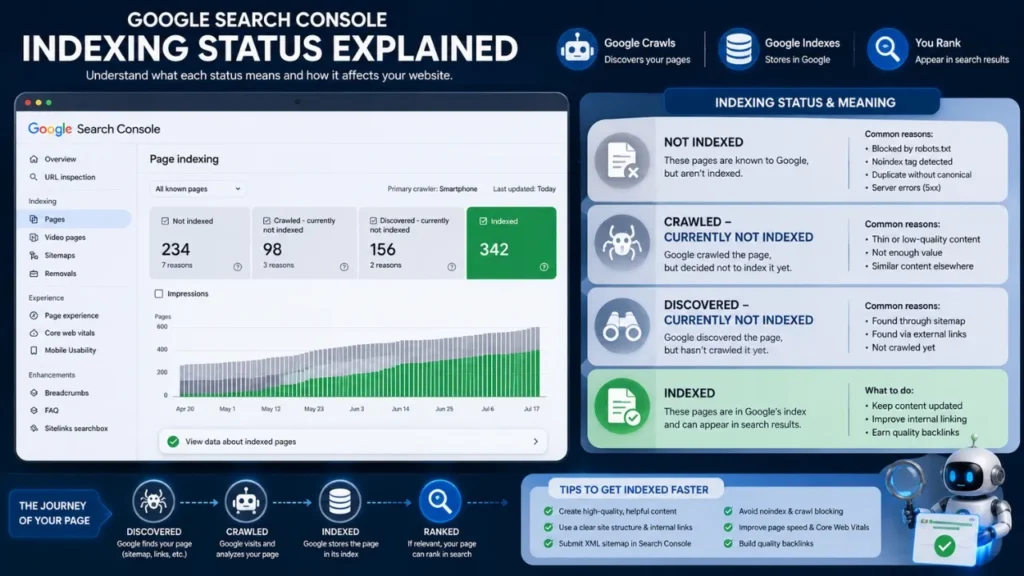
The Page Indexing Report in Google Search Console provides valuable insights into how Google processes your website’s pages. Instead of simply telling you whether a page is indexed, it explains why certain pages are included or excluded from Google’s search index.
Understanding these indexing statuses is essential for diagnosing technical SEO issues, improving crawl efficiency, and ensuring your most important pages appear in search results.
Below are the most common indexing statuses you’ll encounter and what each one means.
For a complete explanation of every indexing status, review Google’s official Page Indexing Report documentation, which explains why pages are indexed, excluded, or marked as duplicates.
Indexed
This is the status every website owner wants to see.
It means Google has successfully crawled, processed, and added the page to its search index. Once a page is indexed, it becomes eligible to appear in Google Search results.
However, indexed doesn’t automatically mean ranked. Google still evaluates hundreds of ranking factors before deciding where the page should appear for different search queries.
What you should do:
- Continue updating the content regularly.
- Build relevant internal links.
- Earn quality backlinks.
- Monitor rankings and traffic through Google Search Console and Google Analytics.
Crawled – Currently Not Indexed
This status means Google has successfully crawled your page but decided not to add it to the search index at this time.
This is one of the most common indexing issues reported in Google Search Console.
Possible reasons include:
- Thin or low-value content
- Duplicate or highly similar pages
- Weak topical authority
- Poor internal linking
- Limited user value
- Temporary quality evaluation
How to fix it:
- Expand the content with more useful information.
- Add examples, images, and original insights.
- Improve internal linking.
- Remove duplicate content.
- Request indexing after making significant improvements.
Avoid repeatedly requesting indexing without improving the page, as Google is unlikely to change its decision if nothing has changed.
Discovered – Currently Not Indexed
This status indicates that Google knows the page exists but hasn’t crawled it yet.
Unlike the previous status, Google hasn’t evaluated the content because it hasn’t visited the page.
Common causes include:
- Brand-new websites
- Large websites with thousands of URLs
- Poor internal linking
- Limited crawl budget
- Low-priority pages
How to fix it:
- Link the page from important sections of your website.
- Add it to your XML sitemap.
- Improve overall website authority.
- Remove unnecessary low-quality pages that waste crawl resources.
As Google revisits your website, these pages are often crawled automatically.
Excluded by Noindex
This status means your page contains a noindex directive that explicitly tells Google not to include it in search results.
Google is following your instructions correctly.
Typical reasons include:
- Private pages
- Thank-you pages
- Login pages
- Staging websites
- Accidentally configured SEO plugin settings
How to fix it (if the page should appear in Google):
- Remove the noindex meta tag or HTTP header.
- Check your SEO plugin settings.
- Inspect the URL again in Google Search Console.
- Request indexing after making the change.
If the page is intentionally private, no action is required.
Alternate Page with Proper Canonical
This status isn’t necessarily an error.
It means Google found multiple similar pages and chose another URL as the canonical (preferred) version.
For example:
- HTTPS and HTTP versions
- Product pages with tracking parameters
- Printer-friendly URLs
- Pagination duplicates
Google indexes only the canonical version while excluding the alternate versions.
What to do:
- Verify that the canonical tag points to the correct page.
- Ensure duplicate URLs are intentional.
- Avoid unnecessary URL variations.
If the canonical implementation is correct, no further action is needed.
Duplicate Without User-Selected Canonical
Google has detected duplicate pages but couldn’t determine which version you intended to be the primary page.
As a result, Google chooses its own canonical URL.
This often happens because:
- Multiple pages target the same topic.
- Canonical tags are missing.
- URL parameters create duplicate versions.
- Similar product or category pages exist.
How to fix it:
- Add self-referencing canonical tags.
- Consolidate duplicate content.
- Redirect unnecessary duplicate URLs.
- Maintain one authoritative version of each page.
Clear canonical signals help Google index the correct URL.
Soft 404
A Soft 404 occurs when a page technically returns a 200 OK status code but provides little or no meaningful content.
Google interprets these pages as “not found,” even though the server doesn’t return an actual 404 error.
Common examples include:
- Empty category pages
- Thin placeholder pages
- Deleted products with no replacement
- Pages displaying “No results found”
How to fix it:
- Add valuable, unique content.
- Redirect obsolete pages to relevant alternatives.
- Return a proper 404 or 410 status for permanently removed pages.
Avoid leaving empty pages accessible to search engines.
Blocked by Robots.txt
This status means your robots.txt file is preventing Googlebot from crawling the page.
Because Google cannot access the content, it may be unable to evaluate or index the page.
A typical blocking rule looks like this:
User-agent: *
Disallow: /private/
Sometimes developers accidentally block important sections of a website during development and forget to remove the restriction before launch.
How to fix it:
- Review your robots.txt file.
- Remove unnecessary Disallow directives.
- Test the URL in Google Search Console.
- Allow Googlebot to crawl important pages.
Only block pages that genuinely don’t need to appear in search results.
Key Takeaway
Each indexing status in Google Search Console tells a different story. Some statuses—such as Indexed and Alternate Page with Proper Canonical—are perfectly normal, while others require immediate attention. By understanding what each status means and responding appropriately, you can resolve indexing problems faster, improve your technical SEO, and ensure that your most valuable pages remain visible in Google Search.
Common Indexing Mistakes to Avoid
Even if you’ve optimized your website and submitted your pages to Google Search Console, certain mistakes can still delay or prevent indexing. Many of these issues are avoidable and often occur because website owners focus on publishing content without paying enough attention to technical SEO and content quality.
Avoiding the following mistakes will improve your chances of getting pages indexed faster and maintaining long-term search visibility.
Publishing Thin AI-Generated Content
AI writing tools can speed up content creation, but publishing unedited, low-value AI-generated content is one of the biggest indexing mistakes.
Google doesn’t penalize content simply because AI helped create it. However, it does evaluate whether the content is helpful, original, accurate, and valuable. Articles that merely rewrite existing information without adding unique insights may be crawled but never indexed.
Common signs of thin AI-generated content include:
- Repetitive paragraphs
- Generic advice without examples
- Outdated or inaccurate information
- No personal experience or expert insights
- Keyword stuffing
- Very short articles covering broad topics
Best practice:
Use AI as a writing assistant—not as the final author. Edit every article by adding:
- Original examples
- Real-world experience
- Expert recommendations
- Updated facts and statistics
- Actionable steps
- Clear explanations that satisfy search intent
Publishing fewer high-quality articles is far more effective than publishing many low-value pages.
Ignoring Technical SEO Issues
Great content alone isn’t enough if Google can’t crawl or understand your pages.
Technical SEO problems are one of the most common reasons pages remain unindexed.
Frequently overlooked issues include:
- Noindex meta tags
- Robots.txt blocks
- Broken canonical tags
- XML sitemap errors
- Slow server response
- Crawl errors
- Redirect chains
- Mobile usability problems
Many of these issues can be identified quickly through Google Search Console.
Best practice:
Perform a technical SEO audit regularly and resolve errors before publishing large amounts of new content.
Forgetting Internal Links
Googlebot discovers many pages by following internal links.
If a newly published article has no links pointing to it, Google may take much longer to find and crawl it.
These isolated pages are known as orphan pages, and they often receive little or no organic traffic.
Best practice:
Whenever you publish a new article:
- Link to it from relevant older articles.
- Add it to category or pillar pages.
- Use descriptive anchor text.
- Create topic clusters around related content.
A strong internal linking strategy improves both indexing and user navigation.
Submitting Broken URLs
Requesting indexing for a page that returns an error is a common but unnecessary mistake.
Examples include:
- 404 Not Found pages
- Redirect loops
- URLs containing typing mistakes
- Pages returning 500 server errors
- Draft or unpublished pages
Submitting these URLs wastes crawl resources and delays the indexing of important content.
Best practice:
Before requesting indexing:
- Confirm the page loads correctly.
- Check for the correct HTTP status code (200 OK).
- Verify the canonical URL.
- Test the page in Google Search Console’s URL Inspection Tool.
Only submit fully functional pages.
Constantly Editing New Pages
It’s normal to make small corrections after publishing, but making major edits every few hours can delay Google’s evaluation process.
If Google crawls a page while you’re repeatedly changing headings, content, URLs, or metadata, it may postpone indexing until the page appears more stable.
Best practice:
Complete your optimization before publishing whenever possible.
This includes:
- Finalizing the content
- Optimizing title and meta description
- Adding internal links
- Checking images and alt text
- Verifying technical SEO settings
Once everything is ready, publish the page and request indexing if necessary.
Expecting Instant Indexing
One of the biggest misconceptions in SEO is believing that Google should index every page immediately after publication.
In reality, indexing depends on many factors, including:
- Website authority
- Crawl frequency
- Content quality
- Technical SEO
- Internal linking
- Overall trust signals
Even after requesting indexing in Google Search Console, Google may take several days—or even weeks—to process a page.
Repeatedly clicking Request Indexing rarely speeds up the process.
Best practice:
Be patient and focus on creating high-quality content while maintaining a technically healthy website. Over time, Google will crawl your site more frequently, making future pages eligible for faster indexing.
Final Thoughts
Most Google indexing problems aren’t caused by a single major issue but by a combination of small mistakes. Publishing low-quality content, overlooking technical SEO, neglecting internal links, or expecting immediate results can all slow down the indexing process.
The most effective long-term strategy is simple: create helpful, original content, maintain a technically optimized website, strengthen your internal linking structure, and monitor Google Search Console regularly. By avoiding these common mistakes, you’ll improve your chances of getting your pages indexed quickly and building sustainable organic traffic.
Key Takeaways
If you remember only a few things from this guide, make them these. Following these best practices will help you improve your website’s indexing rate and reduce the chances of pages being excluded from Google Search.
- Google must crawl a page before it can index it. If Googlebot cannot discover or access your page, it will never appear in search results.
- Google Search Console is the best tool for diagnosing indexing issues. Use the URL Inspection Tool and Page Indexing Report to identify exactly why a page isn’t indexed.
- Thin content, duplicate content, and technical SEO problems are among the most common causes of indexing failures. Focus on creating helpful, original content while resolving issues such as noindex tags, robots.txt blocks, and incorrect canonical tags.
- Strong internal linking and an updated XML sitemap help Google discover new pages faster. Make sure every important page is linked from relevant content and included in your sitemap.
- High-quality, original content significantly improves your chances of getting indexed. Pages that provide real value, satisfy search intent, and demonstrate expertise are more likely to be indexed and ranked.
- Regular monitoring prevents long-term indexing issues. Check Google Search Console frequently to detect crawl errors, indexing problems, and technical SEO issues before they impact your organic traffic.
By combining helpful content, solid technical SEO, and consistent monitoring, you’ll create a website that’s easier for Google to crawl, index, and rank. While no method can guarantee instant indexing, following these best practices gives your pages the strongest possible chance of appearing in Google Search.
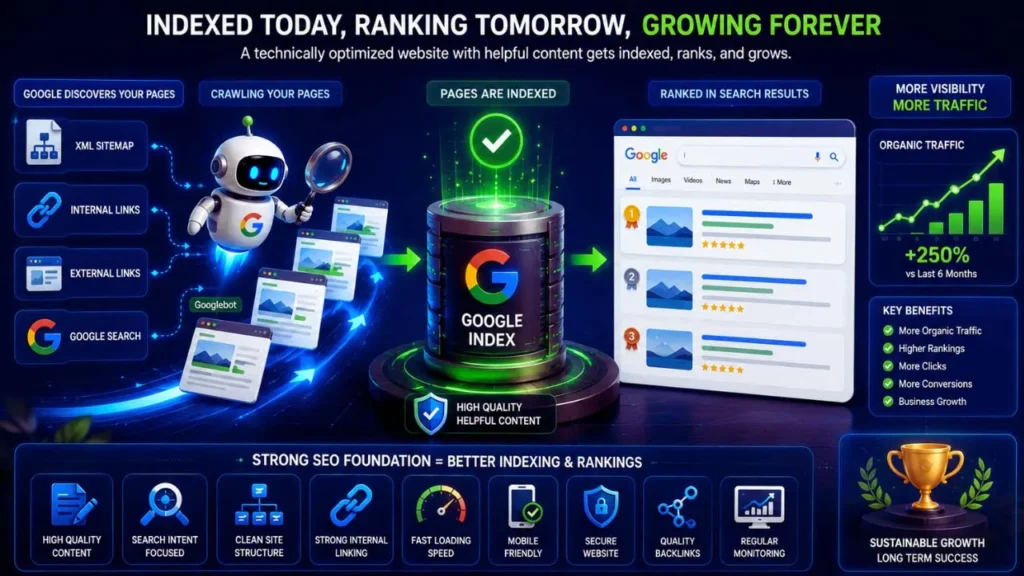
Conclusion
If Google isn’t indexing your pages, the problem is rarely random. In most cases, it’s caused by issues such as low-quality or duplicate content, noindex directives, robots.txt restrictions, incorrect canonical tags, weak internal linking, missing XML sitemaps, slow website performance, or other technical SEO problems. The key is to identify the root cause instead of repeatedly requesting indexing without making meaningful improvements.
Successful indexing starts with creating helpful, original content that genuinely satisfies user intent. Combine that with a technically sound website, a clear site structure, strong internal linking, and an up-to-date XML sitemap, and you’ll give Google the signals it needs to discover, crawl, and index your pages more efficiently.
Make Google Search Console a regular part of your SEO workflow. Check the Page Indexing Report, inspect important URLs, monitor crawl errors, and fix issues as soon as they appear. Regular monitoring allows you to catch problems early, preventing them from affecting your search visibility and organic traffic.
Finally, remember that indexing is not a one-time task—it’s an ongoing process. As your website grows, continue publishing high-quality content, maintaining technical SEO, and monitoring your site’s health. By staying consistent and focusing on long-term optimization, you’ll improve your chances of getting pages indexed faster, earning better rankings, and building sustainable organic traffic over time.
Struggling to get traffic to your website? Explore our SEO and digital marketing guides to learn proven strategies for improving rankings, increasing visibility, and growing your organic traffic faster.
Still having trouble getting your pages indexed?
Explore our complete collection of Technical SEO and Google Search Console guides on Tech Terapias to learn proven strategies for improving crawlability, indexing, and organic search performance.
Frequently Asked Questions (FAQs) :
Google may not index your pages for several reasons, including thin or low-quality content, duplicate content, noindex meta tags, robots.txt restrictions, incorrect canonical tags, poor internal linking, server errors, or crawl budget limitations. Use Google Search Console to identify the specific reason and resolve the issue before requesting indexing.
You cannot force Google to index a page, but you can encourage faster indexing by publishing high-quality content, removing technical SEO issues, adding internal links, including the page in your XML sitemap, and using the URL Inspection Tool in Google Search Console to request indexing. Google ultimately decides whether and when a page will be indexed.
There is no fixed timeline. High-authority websites may have new pages indexed within a few hours or days, while new or low-authority websites may wait several weeks. Indexing speed depends on factors such as website authority, content quality, internal linking, XML sitemaps, backlinks, and crawl frequency.
This status means Google has successfully crawled your page but has chosen not to add it to its search index yet. Common reasons include thin content, duplicate information, weak topical authority, or limited user value. Improving the content and technical SEO before requesting reindexing often resolves the issue.
This status indicates that Google knows your page exists but hasn’t crawled it yet. It commonly occurs on new websites, large websites with many URLs, or pages with poor internal linking. Adding the page to your XML sitemap and improving your site’s internal linking can help Google crawl it sooner.
Yes. If Google finds multiple pages containing nearly identical content, it may index only one version while excluding the others. Using canonical tags, consolidating similar pages, and avoiding unnecessary duplicate URLs helps Google identify the preferred version for indexing.
Yes, an XML sitemap helps Google discover new and updated pages more efficiently. However, submitting a sitemap does not guarantee indexing. Google still evaluates the quality and usefulness of each page before deciding whether to include it in its search index.
The most reliable method is to use the URL Inspection Tool in Google Search Console. You can also search using the site: operator in Google Search, such as:
site:yourdomain.com/page-url
If the page appears in the results, it has likely been indexed. For the most accurate information, always verify the status in Google Search Console.
Your blog posts may not appear because they haven’t been indexed, target highly competitive keywords, contain low-quality or duplicate content, have technical SEO issues, or lack sufficient internal links and backlinks. Reviewing your Page Indexing Report in Google Search Console is the best way to identify the underlying cause.
For most websites, checking Google Search Console at least once a week is recommended. If you publish content frequently or manage a large website, reviewing indexing reports every few days can help you detect crawl errors, indexing issues, and technical SEO problems before they impact your organic search performance.
About The Author:

Sona Bera Kar
Founder of Toppez Digital
I’m Sona Bera Kar, the founder of Toppez Digital and a digital marketing professional with over five years of experience in SEO, blogging, WordPress, AI tools, and affiliate marketing. Through Tech Terapias, I share practical, research-backed, and experience-based insights, guides, and advice on digital marketing and technology. My goal is to help bloggers, content creators, entrepreneurs, and business owners build better websites, improve their search visibility, and grow their online presence and businesses with confidence.
Related Articles
Continue learning with these in-depth SEO guides:
- Complete Technical SEO Checklist for Bloggers in 2026 – A step-by-step checklist to improve your website’s crawlability, indexing, and search performance.
- How to Submit a Sitemap to Google Search Console – Learn how to create, submit, and troubleshoot XML sitemaps for faster page discovery.
- Google Search Console Complete Guide for Beginners – Understand every important report, including URL Inspection, Page Indexing, Performance, and Core Web Vitals.
- How to Find Low-Competition Keywords for New Blogs – Discover proven keyword research techniques to find easy-to-rank keywords and grow organic traffic.
- Core Web Vitals Explained: How to Improve Website Speed for Better SEO – Learn how LCP, INP, and CLS affect user experience, crawling, and rankings.
- How to Fix Crawled – Currently Not Indexed in Google Search Console – A complete troubleshooting guide to resolve one of the most common indexing issues.
- Technical SEO vs On-Page SEO: What’s the Difference? – Understand how both SEO strategies work together to improve search visibility.
- SEO, GEO & AEO Explained: The Future of Search Optimization – Learn how traditional SEO, Generative Engine Optimization (GEO), and Answer Engine Optimization (AEO) work together in the AI era.