🔰 Introduction :
In today’s fast-paced digital age, it’s harder than ever to stay focused. Social media, notifications, and the endless temptation of online content all wreak havoc on our attention. If you’re a student, working from home, or a freelancer, staying focused can be a real challenge.
Fortunately, Google Chrome has a number of free extensions that can help you block distractions, manage your time, and boost your productivity. In today’s article, we’ll take a look at the 7 best free Chrome extensions for staying focused.
Discover 7 free Chrome extensions to stay focused and avoid distractions. Boost productivity with tools like Stay Focused, Forest, and more.
📌 Why is it hard to stay focused ?
The internet is full of distractions, and Chrome is often the gateway to them. Here are some common reasons why it’s hard to stay focused:
- Repeated pop-up notifications from apps and websites
- Social media scrolling habits
- Watching “just one more” video on YouTube
- Having too many tabs open at once
- Working from home without boundaries
If any of these problems sound familiar to you, you’re not alone. The good news is: Chrome extensions can help.
🛠️ How do Chrome Extensions help ?
Productivity-focused Chrome extensions are lightweight and simple tools that add to your browser to:
- Block distracting websites
- Set daily time limits for specific websites
- Provide timers to manage your work/rest cycle
- Create a focused and minimal workspace
- Turn new tabs into inspiring dashboards
🧩 7 Best Free Chrome Extensions to Stay Focused :
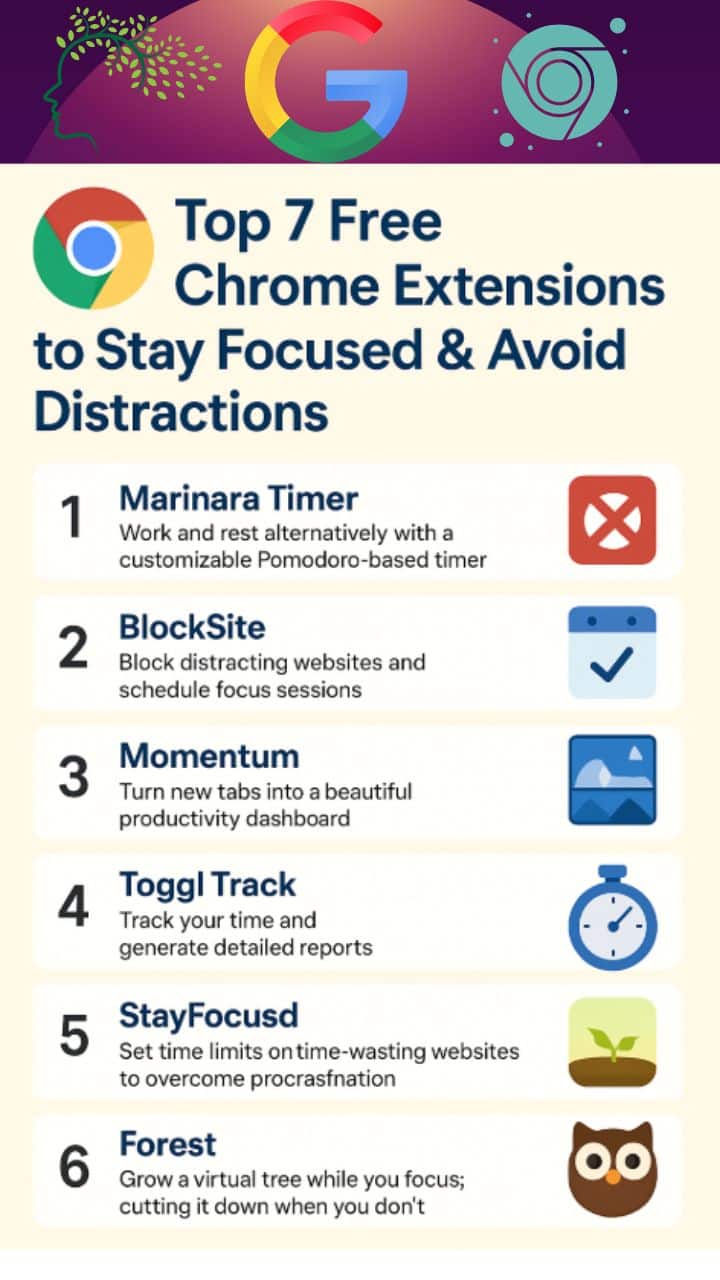
A. ✅ StayFocusd
StayFocusd is a powerful Chrome extension to helps you stay productive on time for all sides. It limits your time on websites that distract you — like Facebook, YouTube, Twitter, or news sites.
When you’ve spent a certain amount of time, StayFocusd automatically blocks those websites completely. You can’t access them again — even if you want to — until the next day!
🌟 Key features:
✅ Set daily time limits for specific websites or pages
✅ Block all internet access for a specific period of time with the “Nuclear Option”
✅ Create customized block lists and exception lists
✅ Highly configurable — you can block only video pages or specific URLs
🧠 Who is it for?
- Those who spend hours browsing YouTube or Facebook
- Students who get distracted by their mobile or computer while studying
- Freelancers or remote workers who want to finish work by a certain time
- Want to control their social media addiction
🔒 Why is it effective?
StayFocusd is designed in such a way that you are not in control — rather, the extension forces you to stay focused. Once you set a time limit, you can no longer use that website. Even changing the settings requires some difficult steps (like answering a question), so that you don’t easily open it.
📌 Additional tips:
- Block only 2-3 sites at first to form a habit
- Use the “Nuclear Option” for work time
- Practice not unblocking sites during breaks
StayFocusd is a tool that creates boundaries in your digital life — and that is the biggest challenge to maintaining focus.
Try it for a week — and then you will see for yourself how big a difference it makes.
B. ✅ Forest
Forest is a unique Chrome extension that uses gamification to help you stay focused while working. It not only increases focus, but also has a real-life effect – when you focus, a virtual tree grows, and if you visit a distracting website during that time, the tree dies.
Forest is based on the Pomodoro method (25 minutes of work + 5 minutes of break). With this extension, you can set a time for focus and block certain websites until that time.
🌟 Special features of Forest:
✅ Gaming style focus: When you focus, trees grow. This creates a sense of reward in the brain for focusing.
✅ Real tree planting: You can plant real trees using coins earned through the app through the Tree-Planting project.
✅ Mobile app integration: Forest has Android and iOS versions, which helps you stay focused on mobile as well.
✅ Whitelist Mode: You can allow access to only certain websites if you want, and the rest will be blocked.
🎯 Who should use Forest?
- Those who want to get out of the “scroll trap” (e.g. Facebook, Instagram, YouTube)
- Those who want to stay focused while studying or working
- Those who want to get involved in an environmentally friendly initiative (to plant real trees)
- Those who like the Pomodoro system but want a fun twist
🧠 Psychologists’ opinion:
Gamification and reward systems help people stay focused. Extensions like Forest add a mental reward behind attention, which helps it become a habit.
C. ✅ Noisli
Noisli is a great Chrome extension that helps you focus through background sounds. Research shows that certain sounds, such as rain, wind, or white noise, calm our minds, and increase our focus.
If you want a tool that blocks out the annoying sounds around you and creates a more focused environment, Noisli is definitely for you.
🌟 Key features:
✅ Choose from a variety of ambient sounds, such as rain, firecrackers, fans, coffee shops, forests, etc.
✅ Mix sounds to create your own unique environment
✅ Real-time sound customization (with volume adjustment)
✅ Pomodoro Timer feature, so you can take a break after a specific amount of time
✅ Log in and use your saved sound combos according to your profile
🎯 Who should use it?
- Freelancers, writers, designers or developers who work from home
- Those who live in noisy environments and lose concentration
- Those who want to work without music, but also don’t like monotonous silence
- Those who practice mindfulness or deep work
🧘♀️ Peace of mind and productivity – together:
Noisli not only increases attention, but also reduces stress. If you want, you can create a virtual environment by mixing the sound of light rain, the chirping of birds in the forest and the light noise of a cafe – which calms you down and helps you stay focused for a long time.
📌 Additional benefits:
Can be created during work (Focus Mode)\n- Listen before bed (Sleep Mode)\n- Great for studying or meditation\n\n—
Noisli is the kind of extension that, once you use it, you will never be bored with your workspace again.
Not just a sound — it’s like a feeling that gets you in the right mood.
🌟 Try it once — both your mind and attention will be happy.
D. Marinara Timer :
Marinara Timer is a free Chrome extension that uses the popular Pomodoro technique to break up your work time into small chunks—like 25 minutes of work, 5 minutes of break. This helps you stay focused and reduce time wasting.
✅ How to Use Marinara Timer (Step-by-Step)
Install on Chrome:
Go to Google Chrome browser and search for “Marinara: Pomodoro® Assistant” to install it.
Pin to Toolbar:
After installing, pin the extension for easy access.
Select Timer Mode:
- Pomodoro (The time of work is 25 minutes, with add 5 minutes break.)
- Custom Timer (set your own time)
- Kitchen Timer (simple countdown)
Start Pomodoro:
Click Start to start working. Work continuously for the set time.
Take a break:
A short break will automatically start when the time is up. You will also get a long break after every 4 Pomodoros.
Track your progress:
The number of Pomodoros you complete per day is recorded.
⭐ Benefits of Marinara Timer
This is an ideal Chrome extension for students, freelancers, and office workers. It increases focus, helps with time management, and keeps you away from distractions.
E. BlockSite :
BlockSite is a popular and powerful Chrome extension that helps you stay away from websites and apps you specify. It is designed to reduce distractions, increase self-control, and boost productivity.
✅ How BlockSite Works (Step-by-Step)
i) Install:
Search for “BlockSite” from the Chrome Web Store and install it.
ii) Add unnecessary sites:
Example: Facebook, YouTube, Instagram — add those that waste your time to the blocklist.
iii) Set a schedule:
You can specify which sites will be blocked at what time. For example: during reading or working hours.
iv) Turn on Focus Mode:
Set a timer in Pomodoro style — 25 minutes of work, 5 minutes of rest.
v) Password Protection:
You can also set a password so that no one can change your blocklist if you want.
⭐ Why use BlockSite?
- To maintain focus while studying
- To stay away from social media while working
- To reduce time wasting
- To reduce device addiction
F. Momentum :
Momentum transforms your boring new tab into a visually stunning and goal-focused workspace, designed to boost your daily productivity.. It helps you stay organized and motivated at every moment.
✅ Steps to use Momentum:
i) Install:
Install “Momentum” from the Chrome Web Store.
ii) See the change as soon as you open a new tab:
Every new tab will have a beautiful landscape, an inspirational quote, and time.
iii) Set a Daily Focus:
You can write down your main daily goal or task — something to remind you of throughout the day.
iv) Use the To-Do List:
Add your tasks to Momentum’s easy-to-use To-Do list feature and track your progress.
v) Customize Widgets:
You can customize the time, weather, link shortcuts, and more.
⭐ Why choose Momentum?
- New inspirational backgrounds and quotes every day
- Opportunity to set your goals
- Increases productivity and focus
G. Toggl Track :
Toggl Track is a popular and user-friendly Chrome extension that helps you track how much time you spend on a task every day in detail. It is especially useful for freelancers, students, office workers, and remote workers.
✅ How Toggl Track works (Step-by-Step):
i) Install:
Install “Toggl Track: Productivity & Time Tracker” from the Chrome Web Store.
ii) Create an account or log in:
Create a free account and log in.
iii) Start a new task:
Input your job title and start the timer to track your progress in real-time. The time will start counting.
iv) Stop when the task is finished:
Click the Stop button to save the task. It will be added to the report.
v) View reports and analytics:
You can see how much time you have spent on which tasks in the form of graphs and reports.
⭐ Why use Toggl Track?
- To keep accurate time records
- To analyze productivity
- To determine billable time (for freelancers)
- To monitor work progress
Extra Tips to Stay Focused:
It is not possible to maintain focus just by using extensions — it is also important to develop some life-long habits. Below are some additional effective tips for increasing focus, which can greatly increase your productivity:
✅ 1. Plan before work
Create a To-Do List before starting your daily work. This will help you clearly understand which tasks need to be done first.
✅ 2. Keep your phone on silent mode
Social media notifications are distracting. Keep your phone on silent or focus mode while working.
✅ 3. Do one thing at a time (Single-tasking)
Do not do many things at once and give full attention to one task. This will also improve the quality of your work.
✅ 4. Take short breaks between work
Taking a 5-minute break every 25–30 minutes gives your brain a rest and your attention lasts longer.
✅ 5. Take physical and mental care
Getting enough sleep, drinking water, and light exercise help you maintain your focus.
Conclusion:
Staying focused in this digital age is becoming increasingly difficult. However, with the right tools and some essential habits, you can easily avoid distractions and stay focused. The 7 best Chrome extensions discussed in this article — such as StayFocusd, Noisli, Marinara Timer, BlockSite, Momentum, Toggl Track, and Forest — will not only help you stay focused, but also ensure that you make the most of your time.
Each extension is designed with different features and purposes — some track time, some block sources of time wasters, and some provide inspiration. So choose one or more extensions according to your work style and build a focused, productive, and digitally disciplined life.
FAQs:
Are these Chrome extensions completely free to use?
Yes, all of the extensions listed in this article offer free versions that are useful enough for most users. Some extensions, like Toggl Track or Forest, may offer premium upgrades with advanced features, but their core functionality is free. You can install and start using them without creating an account in many cases. These free versions are enough to improve your focus, productivity, and online discipline without spending a dime or a dollar.
Are these productivity Chrome extensions safe to use?
Most well-known Chrome extensions like StayFocusd, Momentum, and BlockSite are safe and trusted by millions of users. They are available in the Chrome Web Store, which regularly checks for malware. However, always read user reviews, check permissions before installing, and avoid extensions from unknown developers. Stick to official versions and update regularly to stay safe and increase productivity. Security and focus can go hand in hand when it comes to choosing trusted digital tools.
Can I use multiple extensions at the same time?
Yes, you can use multiple Chrome extensions at the same time without any problems. In fact, combining tools like BlockSite for blocking distractions, Marinara Timer for time management, and Momentum for motivation can create a powerful productivity system. Just make sure they don’t overlap in functionality or slow down your browser. A balanced selection of extensions based on your work habits will ensure smooth performance throughout the day while increasing your focus and efficiency.
Which extension is best for students preparing for exams?
For students, StayFocusd is great for blocking time-wasting sites, while Marinara Timer helps manage study sessions using the Pomodoro technique. Momentum can keep students motivated with daily quotes and focus reminders. Combining them can improve concentration, reduce screen time, and create a more disciplined study routine. These tools are easy to use and ideal for competitive exam preparation, helping students stay focused and track their time efficiently while studying online.
How does StayFocusd work to reduce distractions?
StayFocusd limits your access to distracting websites by letting you set daily time limits. Once your allotted time on a distracting site is up, it automatically blocks access to that site for the rest of the day. You can customize which websites to block and even set active hours. This ensures that you stay focused on your work instead of wasting hours on social media or YouTube. It’s a powerful tool for building digital discipline.
Can I track my daily work time using these extensions?
Of course. Toggle Track is a powerful extension specifically designed to track your work time and work duration. You simply start a timer when you start a task and stop it when you finish. It records everything in reports and helps you see where your time goes. It’s especially useful for freelancers, remote workers, and students.
Do these extensions work offline or only with the internet?
Some extensions, like Forest and Momentum, require an internet connection to function properly when syncing data or displaying online content. However, extensions like Marinara Timer and StayFocusd can work even with limited connectivity because they rely on local browser activity. While not every extension has full offline support, most will work while your Chrome browser is running, making them suitable for low-network situations or when traveling.
Will using too many extensions slow down my browser?
Using too many Chrome extensions at once can affect the browser speed somewhat, especially if they run in the background. However, most of the productivity tools mentioned here are lightweight and optimized. It’s best to install only the ones you really need and disable or remove the unused ones. Regularly clearing the cache and updating extensions can also help maintain smooth performance. Balanced usage ensures productivity without compromising speed or user experience in Chrome.
Can I customize the settings in these extensions?
Yes, all of the extensions discussed offer a good level of customization. For example, Blocksite lets you choose which websites to block and when, while Momentum lets you set personal goals, to-dos, and background themes. Toggle Track lets you organize time entries by project or client. These flexible settings help you tailor tools to your routine, making them more effective at keeping you focused and productive.
🔔 Stay Updated with Tech Terapias
Join our free newsletter and never miss AI tools, blogging tips & smart tech updates!