Google AdSense Approval Checklist: 20 Essential Steps to Get Approved in 2026

Introduction :
Obtaining Google AdSense approval is a crucial milestone for any blogger or website owner. However, many websites face rejection simply because they overlook essential prerequisites before applying. While creating quality content is vital, Google also evaluates factors such as user experience, site navigation, technical setup, and adherence to its ‘Publisher Policies.’
Table of Contents
ToggleThat is why following a Google AdSense approval checklist before submitting your application is essential. A well-structured, organized website not only boosts your chances of approval but also provides a superior experience for visitors—something Google highly values.
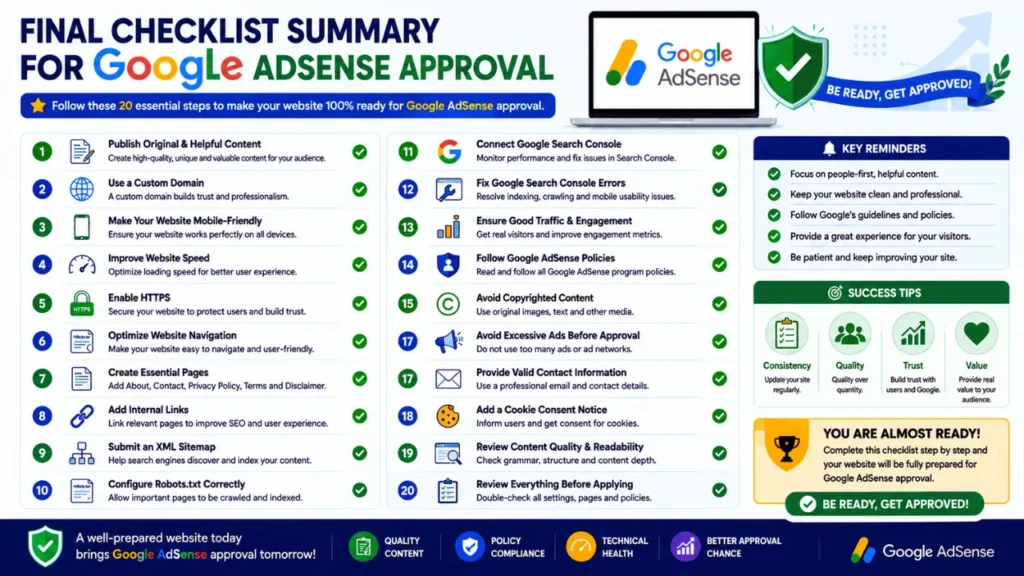
In this comprehensive guide, you will discover 20 critical steps to complete before applying for Google AdSense. From creating the right pages and publishing high-quality content to improving site speed, resolving technical SEO issues, and avoiding common pitfalls—this checklist covers everything you need.
Whether you manage a WordPress blog, a niche website, or a business site, this guide will help you prepare with confidence and maximize your chances of securing Google AdSense approval in 2026.
If you’re new to website monetization, start by learning how to get Google AdSense approval before submitting your application.
What is the Google AdSense approval checklist?
The Google AdSense approval checklist is a step-by-step guide that helps you prepare your website before applying for AdSense. It includes publishing high-quality content, creating essential pages, improving website navigation, optimizing technical SEO, adhering to Google’s publisher policies, and resolving common issues that could lead to application rejection. Following this checklist can increase your chances of getting AdSense approval.
Before applying, it’s a good idea to review the official Google AdSense Program Policies to understand Google’s quality requirements for publishers.
What is Google AdSense approval?
Google AdSense approval is a process in which Google reviews your website to determine if it meets the necessary criteria for displaying AdSense ads. During this review, Google evaluates your website based on content quality, user experience, navigation, technical structure, and adherence to AdSense program policies.
Approval does not depend on a single factor; rather, Google considers your website as a whole. A well-organized website featuring original content, essential pages, a mobile-friendly design, and a good user experience is more likely to be approved.
If your website meets Google’s quality standards, your AdSense account will be approved. This allows you to start displaying ads and earning revenue from your content.
What does Google check before granting AdSense approval?
Before approving your application, Google reviews several key aspects of your website to ensure it is beneficial to users and complies with their policies. Although Google does not disclose a specific scoring system, the following factors play a crucial role during the review:
- Original, useful, and high-quality content
- Clear navigation and website structure
- Essential pages, such as ‘About’, ‘Contact’, ‘Privacy Policy’, and ‘Terms & Conditions’
- Mobile-friendly and responsive design
- Fast loading speed and a secure HTTPS connection
- Proper internal linking and a good user experience
- Adherence to Google AdSense program policies
- Absence of copyrighted, misleading, or prohibited content
- A technically sound and error-free website
The more complete and reliable your website appears, the higher the chances of getting approved.
Google doesn’t publish a fixed approval checklist, but you can learn about its quality expectations in the official Google AdSense Help Center.
Why is a checklist important for AdSense approval?
Many website owners apply for Google AdSense without verifying if their site is fully ready. Consequently, they often receive rejection emails due to issues such as missing policy pages, insufficient or low-quality content, poor navigation, or technical problems that could have been resolved beforehand.
A Google AdSense approval checklist helps you identify and fix these issues before submitting your application. Instead of guessing what Google expects, you can systematically review every crucial aspect of your website—ranging from content quality and technical SEO to user experience and policy compliance.
Following a checklist not only increases your chances of AdSense approval but also helps you build a more professional, reliable, and user-friendly website, leading to better search engine performance in the long run.
Google AdSense Approval Requirements

Before applying for Google AdSense, your website must meet several important quality and technical standards. Google does not approve a website simply because it publishes content; instead, they verify whether your site offers a good user experience, adheres to publisher guidelines, and provides valuable information to visitors.
Everything from content quality and website design to technical functionality and policy compliance plays a role in the review process. Being aware of these requirements beforehand helps you avoid common mistakes and increases your chances of approval.
Publish Original and Useful Content
Having original and useful content is a primary requirement for Google AdSense approval. Every article on your website should contain practical information that answers readers’ questions; it is crucial to present something genuine and new rather than simply repeating content that already exists on other websites.
Avoid copying text, using ‘spun’ content (content generated by automatically altering words or sentences), or publishing articles that lack substantial information. Instead, focus on creating detailed, well-structured, and easy-to-understand content that reflects your knowledge and experience. Regularly updating and improving the quality of older articles can make your website more valuable to both users and search engines.
Learn how to create engaging articles by reading our SEO content writing guide.
Use a Custom Domain
A custom domain gives your website a professional identity and helps build credibility with visitors. While certain free domains may be approved for AdSense under specific circumstances, a custom domain demonstrates that you are serious about your website and its long-term growth.
It strengthens your brand, makes your website easier to remember, and establishes a more reliable online presence. For bloggers and website owners, it is always best to choose a domain name that is simple, relevant, and easy to spell.
Create essential website pages
Every website applying for Google AdSense should include certain essential pages that foster transparency and help visitors understand who you are and how your website operates. These pages also demonstrate that your website is professionally managed and provides valuable information to users.
At a minimum, your website should include ‘About Us’, ‘Contact Us’, ‘Privacy Policy’, and ‘Terms and Conditions’ pages. Depending on the nature of your content, adding a ‘Disclaimer’ page may also be appropriate. Keeping these pages regularly updated ensures that visitors can easily find the information they need.
Make your website mobile-friendly
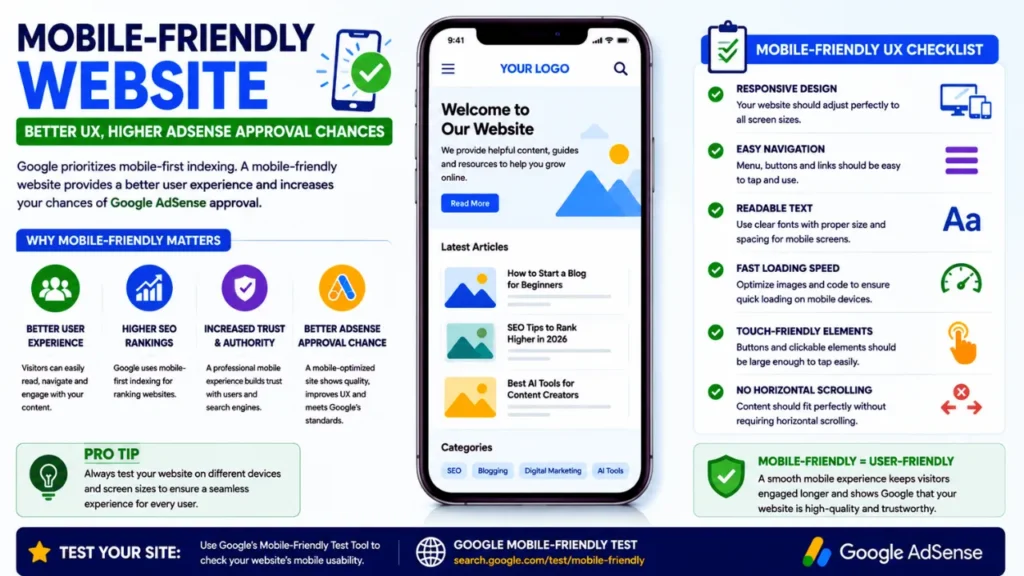
A significant portion of internet users visit websites via smartphones and tablets; therefore, it is crucial to ensure your website functions smoothly across all screen sizes. A mobile-friendly design ensures that text is easy to read, images display correctly, and users can navigate the site easily without needing to zoom in or scroll horizontally.
A responsive website not only improves the user experience but also boosts visitor engagement by making content easily accessible across various devices.
Improve website speed
Website speed is another critical factor that impacts both user experience and the overall quality of the site. Slow-loading pages can frustrate visitors, increase the ‘bounce rate,’ and reduce the time users spend on your website. You can improve loading speeds by optimizing images, minimizing unnecessary scripts, enabling browser caching, and selecting reliable web hosting. A fast-loading website ensures a smoother browsing experience and helps establish a professional image.
Analyze your website’s performance using Google PageSpeed Insights and fix the recommended issues.

Adhere to Google AdSense Policies
It is crucial to comply with Google AdSense program policies before submitting an application. Your website should be free from prohibited or misleading content, copyright violations, excessive advertising, and any practices that negatively impact the user experience.
Thoroughly review your website before applying and ensure that every page meets Google’s quality standards. A website that prioritizes valuable content, transparency, and a positive user experience is more likely to meet AdSense requirements and build long-term trust with both visitors and search engines.
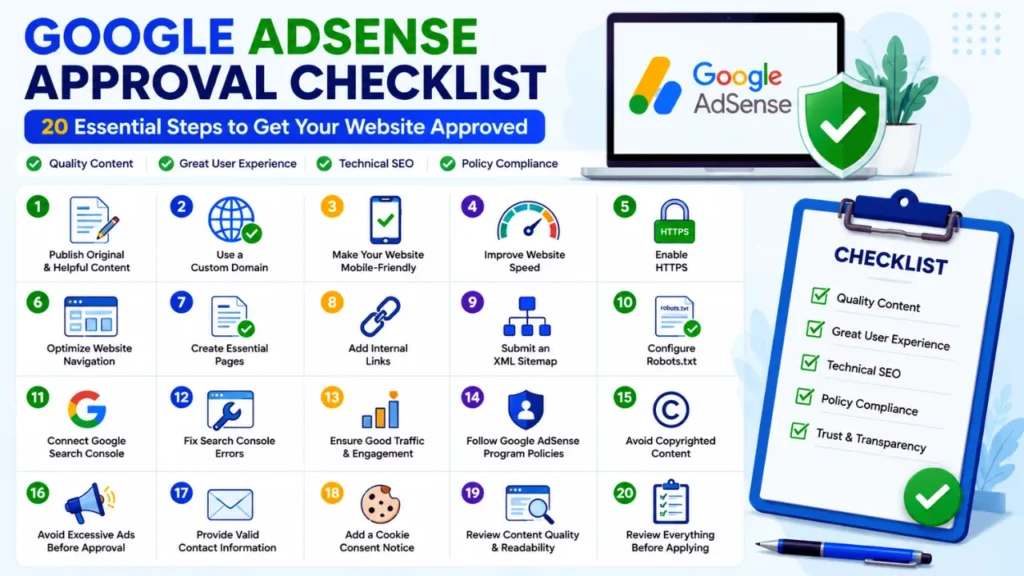
Google AdSense Approval Checklist (20 Essential Steps):

Properly preparing your website before applying for Google AdSense can significantly increase your chances of approval. Instead of applying after publishing just a few articles, thoroughly evaluate key aspects of your website—such as design, content quality, essential pages, and user experience. Below is a checklist of important steps you should complete before applying for AdSense.
1. Choose a clean and professional website design
Your website’s design creates the first impression for both visitors and Google reviewers. A clean, organized, and professional-looking website demonstrates that you care about user experience and content quality.
Select a ‘responsive’ theme that features a simple layout, easy-to-read fonts, and a consistent color scheme. Avoid using cluttered pages, excessive animations, distracting pop-ups, or too many advertisements before getting approved. Your site’s navigation should be intuitive, allowing visitors to find important pages and articles without confusion.
A professional design does not necessarily mean something complex. In fact, a fast-loading, minimalist, and well-structured website often performs better than one cluttered with unnecessary design elements. Ensure that your homepage clearly highlights main categories, recent articles, and key resources to provide users with a positive browsing experience.
2. Publish high-quality and original content
Content is the most critical factor in the AdSense review process. Google wants to display ads on websites that provide genuine value to users. Every article should be original, accurate, well-researched, and written with the aim of solving a specific problem. Refrain from publishing copied content, ‘spun’ articles (rewritten versions of others’ work), or pages created solely to target keywords. Instead, write detailed articles that answer readers’ questions through clear explanations, real-life examples, and essential information.
Consistency is also crucial. Focus on creating fewer, high-quality posts rather than publishing a large number of short articles. Regularly review existing content and update outdated information to keep your website relevant and reliable.
3. Create an ‘About Us’ page
An ‘About Us’ page helps visitors understand who you are, what your website is about, and why they should trust your content. It also demonstrates to Google that your site is not merely a collection of anonymous articles but is managed by a real person or organization.
Your ‘About’ page should provide a brief overview of the website’s purpose, the topics covered, and your goals or mission. If you possess relevant experience or expertise in your specific field (niche), mention it naturally. You can also include information regarding your editorial standards, content objectives, and how readers can benefit from your website.
A transparent ‘About’ page boosts your site’s credibility and enhances the overall user experience.
4. Add a ‘Contact’ page
A ‘Contact’ page is another essential element that reflects transparency and professionalism. It provides visitors with a way to reach out to you regarding questions, feedback, or business inquiries.
Your contact page should include a contact form, an email address, or another reliable method of communication. If you represent a business or brand, you can also include business details and links to official social media profiles. Providing easy access to contact information builds trust with visitors and demonstrates that your website is actively maintained.
5. Create a Privacy Policy
A privacy policy explains how your website collects, stores, and uses visitor information. This page is crucial if your website utilizes cookies, analytics tools, contact forms, or advertising services like Google AdSense.
Your privacy policy should clearly outline the types of data collected, how that data is used, whether any third-party services process the data, and how users can manage their privacy preferences. The policy should be easy to understand and updated regularly to reflect any changes in the website’s data practices.
A clear privacy policy not only fosters transparency but also demonstrates that your website adheres to recognized standards for user privacy and responsible data management; consequently, it is a vital component of the Google AdSense approval checklist.
6. Add a ‘Terms and Conditions’ Page
A ‘Terms and Conditions’ page outlines the rules and guidelines for using your website. Although not legally mandatory in every country, having this page makes your website appear more professional and transparent. It helps visitors understand their rights and responsibilities regarding the use of your content, services, or downloadable resources.
Your ‘Terms and Conditions’ page should specify how visitors may use the site, address your intellectual property rights, outline limitations of liability, and state any restrictions on copying or redistributing content. If you offer services such as newsletters, digital products, or affiliate recommendations, you can include the terms for those as well.
A well-written ‘Terms and Conditions’ page demonstrates that your website adheres to professional publishing standards and helps establish a trustworthy online presence.
7. Add a ‘Disclaimer’ Page
A ‘Disclaimer’ page informs visitors about the limitations of your content and clarifies that the information provided is for educational or informational purposes only. This page becomes particularly important if your website features affiliate links, product reviews, financial advice, or technical recommendations.
For instance, if you recommend digital marketing tools or software, you should explain that your opinions are based on research or personal assessment and that readers should make their own decisions before purchasing any product or service.
Adding a ‘Disclaimer’ page enhances transparency and helps visitors understand the purpose of your content. It also reflects responsible publishing practices, which can boost your website’s credibility.
8. Use a Custom Domain
A custom domain is a fundamental feature of a professional website. Instead of using a free subdomain, choose a unique domain name that represents your brand and is easy for visitors to remember. A custom domain enhances your website’s credibility, aids in long-term branding, and creates a positive impression during the AdSense review process. Additionally, it grants you greater control over your website as it grows.
When selecting a domain name, aim for something short, easy to spell, and relevant to your niche or field of work. A memorable domain makes it easier for users to recognize your site and return to it in the future.
9. Enable HTTPS

Website security is a crucial aspect of user experience. Enabling HTTPS encrypts the connection, securing the data exchanged between your website and your visitors. Modern browsers flag websites without HTTPS as “Not Secure,” which can undermine visitor trust. Most hosting providers offer free SSL certificates, making it easy to activate HTTPS. Once SSL is enabled, ensure that all pages, images, and internal links load securely without triggering “mixed content” warnings.
A secure website not only protects user data but also fosters a reliable browsing experience and reflects professional website management.
10. Improve Site Speed
Website speed directly impacts user satisfaction. Visitors expect pages to load quickly; slow-loading websites often suffer from high bounce rates and low engagement.
To improve loading speed, optimize image sizes, remove unnecessary plugins or scripts, enable browser caching, and choose a reliable hosting provider. Keeping your website lightweight helps pages load faster on both desktop and mobile devices.
Regularly monitoring your site’s performance allows you to identify and resolve issues before they negatively affect your users. A fast and responsive website creates an enhanced experience for visitors and supports the overall quality standards that Google AdSense looks for during the review process.
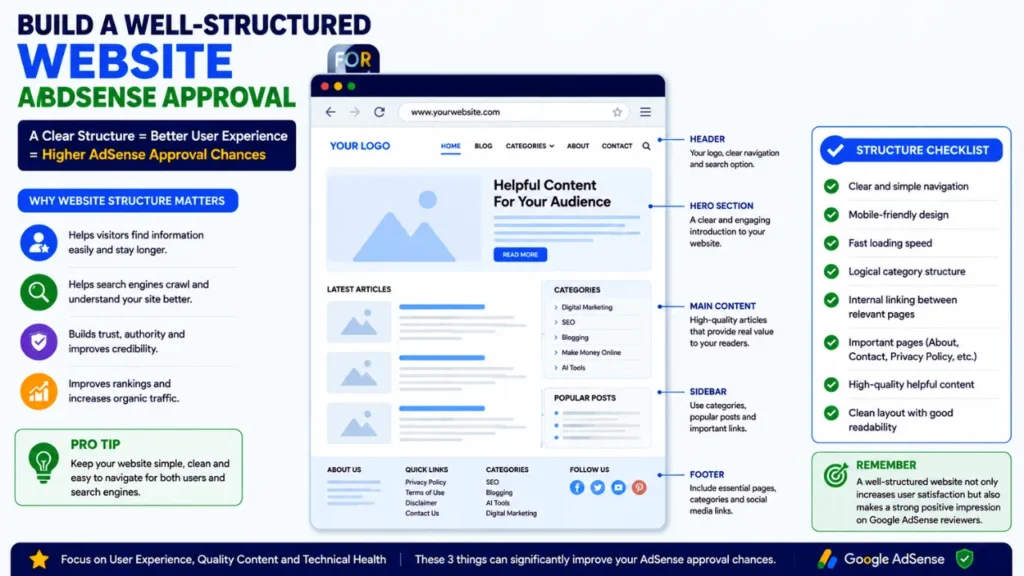
11. Optimize Website Navigation
A well-organized navigation menu helps visitors quickly find the information they need and improves their overall browsing experience. Google prioritizes websites with a logical structure because the information on them is easier to crawl and understand.
Keep your main menu simple by grouping related topics into clear categories. Avoid adding excessive menu items or unnecessary drop-down menus that could confuse users. Ensure that every important page—including categories, articles, and policy pages—can be easily accessed with just a few clicks.
Clear navigation encourages visitors to explore more pages, boosts engagement, and presents the website as more professional during the AdSense review process.
A well-structured website also supports better rankings. Learn more in our technical SEO checklist.
12. Fix Broken or Non-Functional Links
Broken or non-functional links harm the user experience and make the website appear outdated or neglected. When visitors click a link that results in a “404 Page Not Found” error, they may immediately leave the site.
Before applying for Google AdSense, thoroughly review your website and fix or remove any broken internal and external links. If a page has been deleted, update the link or set up a proper redirect to a relevant page.
Regularly checking for broken links helps maintain the website’s structure and ensures that users can access all your information without interruption.
13. Add Internal Links
Internal linking is crucial for both SEO and user experience. It connects related articles and pages, allowing visitors to discover more relevant content while making it easier for search engines to understand your website’s structure. Naturally incorporate links to other relevant articles on your website when writing new content. For instance, an article about Google AdSense could include links to topics like SEO, blogging, website speed, or content writing. These links should be added to provide extra information or value, rather than solely for SEO purposes.
A robust internal linking strategy encourages visitors to spend more time on your site and demonstrates that your content is well-organized and interconnected.
14. Optimize images with Alt Text
While images enhance the visual appeal of your website, proper optimization is essential. Large image files can slow down page load times; conversely, a lack of Alt Text makes it difficult for users relying on screen readers to understand or access the images.
Compress images to reduce their file size before uploading, ensuring that image quality remains intact. Use descriptive file names and write meaningful Alt Text that accurately explains what each image depicts. Avoid keyword stuffing in Alt Text, as it should primarily serve accessibility purposes.
Optimized images help boost page speed, improve accessibility, and enhance the user experience—all of which contribute to building a high-quality website.
15. Submit an XML sitemap
An XML sitemap helps search engines discover and index your website more efficiently. It provides a well-organized list of your important pages and posts, making it easier for search engine crawlers to understand your site’s content.
Once you have created your sitemap, submit it via Google Search Console and keep it updated whenever you publish new content. Additionally, ensure that your sitemap does not include unnecessary pages, such as duplicate archives or low-value URLs.
While submitting an XML sitemap does not guarantee rapid AdSense approval, it improves your website’s technical SEO and ensures that your important content is more easily accessible to search engines.
Submit your XML sitemap through Google Search Console so Google can discover and index your content more efficiently.

16. Configure Robots.txt Correctly
The Robots.txt file helps search engine crawlers understand which parts of your website they can access and index. While this may seem like a minor technical detail, an incorrectly configured Robots.txt file can prevent important pages from appearing in search results.
Before applying for Google AdSense, verify your Robots.txt file to ensure it does not block any essential pages, posts, or category archives. At the same time, you can restrict access to unnecessary sections, such as admin pages or duplicate system files.
A properly configured Robots.txt file facilitates better crawling and indexing, helping search engines understand your website more effectively.
17. Remove Thin or Low-Quality Content
One of the primary reasons for failing to meet Google’s quality standards is the presence of thin or low-value content on a website. Articles lacking substantial information, repetitive content, or material containing outdated data can diminish your website’s overall quality.
Carefully review your existing articles before applying for AdSense. Update old posts, expand short articles by adding necessary information, and remove pages that offer no value to visitors. Each article should have a clear purpose and provide detailed answers to the reader’s questions.
Prioritizing quality over quantity helps build a robust website and improves the overall user experience.
18. Avoid Using Copyrighted Content
Respecting copyright and intellectual property rights is crucial for building a trustworthy website. Never copy articles, images, videos, or other digital content from another website without obtaining proper permission or a license. When using images, opt for royalty-free sources or licensed media, or create your own original graphics. Similarly, write every article in your own words rather than copying or making only minor alterations to someone else’s content.
Publishing original content demonstrates professionalism and helps establish your website as a reliable source of information—a factor considered crucial during the AdSense review process.
19. Resolve issues in Google Search Console
Google Search Console provides vital information regarding your website’s indexing and technical status. Before submitting your AdSense application, review your Search Console account and resolve any major issues that could impact the site.
Pay attention to indexing issues, crawl errors, mobile usability problems, and security alerts. If Google cannot properly access or index your key pages, visitors may also find it difficult to discover your content through search engines. Regularly monitoring Search Console helps keep your website technically sound and ensures your content remains accessible to both users and search engines.
20. Thoroughly check everything before applying
Before clicking the ‘Apply’ button, give your website a final, thorough review. Browse through every page from the perspective of a new visitor and ensure the site appears complete, professional, and user-friendly.
Verify that all essential pages are present, navigation and menus are functioning correctly, articles are free of spelling or formatting errors, images load properly, and there are no broken links or technical glitches. Additionally, ensure your website offers sufficient, high-quality content for visitors and complies with Google’s publisher guidelines.
Allocating some extra time for this final review allows you to identify minor issues that might otherwise go unnoticed. A well-planned website not only increases the likelihood of Google AdSense approval but also enhances the reader experience and establishes a solid foundation for long-term growth.
💡 Expert Tip:
Before applying for Google AdSense, browse your website as if you were a first-time visitor. If every important page is easy to find, articles are genuinely helpful, and your website looks professional on both desktop and mobile devices, you’re likely in a much stronger position for AdSense approval.
Reasons Why Google AdSense Rejects Websites:

Having a website rejected by Google AdSense can be disheartening, especially after investing significant time in its creation. However, most rejections occur because specific quality, technical, or policy-related criteria have not been fully met. Understanding these common reasons allows you to resolve issues before reapplying and increases your chances of approval.
Below are some common reasons why websites fail to pass the Google AdSense review process:
Insufficient or Low-Quality Content
One of the primary reasons for AdSense rejection is publishing insufficient (very brief) or low-quality content. Articles that are too short, lack necessary information, or are verbatim copies/repetitions from other websites offer little value to readers.
Google prioritizes websites that publish original, informative, and detailed content, providing accurate and effective answers to user queries. Each article should have a clear purpose, include accurate information, and be well-structured with headings, examples, and relevant details.
Instead of publishing numerous short articles, focus on creating fewer but high-quality posts—content that demonstrates your expertise or subject-matter knowledge and provides a positive user experience.
Lack of Essential Pages
Essential pages help build credibility and demonstrate that the website is professionally managed. If your website lacks pages such as ‘About Us,’ ‘Contact Us,’ ‘Privacy Policy,’ or ‘Terms and Conditions,’ Google may view it as incomplete or less trustworthy.
These pages provide visitors with important information about your website, explain how their data is handled, and offer ways to contact you if needed. They also foster transparency, which is a crucial factor in how AdSense evaluates websites. Before applying, ensure that all essential pages are easily accessible via the website’s navigation menu or footer.
Poor Website Navigation
If the website’s structure is confusing, it becomes difficult for both users and search engines to locate your content. If visitors struggle to find important pages or articles, they may quickly leave the site, resulting in a poor user experience.
Your website should feature a simple navigation menu, logical categories, clear internal links, and a well-organized homepage. Visitors should be able to reach key content with just a few clicks.
Good navigation not only enhances usability but also helps search engines better understand your website’s structure.
Policy Violations
Google AdSense has strict publisher policies that every website must adhere to. Websites containing prohibited, misleading, or harmful content are unlikely to be approved.
Common policy violations include deceptive content, excessive or misleading advertisements, spam, low-quality automatically generated content, and content that encourages illegal or unsafe activities. Even if your website looks professional, it may be rejected if it violates these policies.
Carefully review your entire website before applying and ensure that every page meets Google’s quality standards.
Copyright or Intellectual Property Issues
Using copyrighted material without permission is another common reason for AdSense rejection. This includes copied articles, copyrighted images, videos, graphics, or any content owned by others.
Always publish original content and use images that are either self-created or properly licensed. If you use information from other sources, provide proper attribution where necessary, but avoid copying large sections of text verbatim. Creating original content helps build credibility with both visitors and Google, while simultaneously reducing the risk of copyright-related issues.
Technical SEO Issues
Technical issues can also impact your AdSense application. If search engines face difficulties crawling, indexing, or accessing your website, it may indicate that the site is not fully optimized.
Common technical issues include broken links, slow page loading speeds, the absence of HTTPS, mobile usability issues, crawl errors, incorrect robots.txt settings, and problems with the XML sitemap. While these issues do not always lead to immediate rejection, multiple technical flaws can negatively affect your website’s overall quality.
Before applying for Google AdSense, conduct a comprehensive technical review of your website and resolve any issues that could affect user experience or search engine accessibility. A technically flawless website establishes a strong foundation for AdSense approval and long-term SEO success.
How to Increase Your Chances of Google AdSense Approval:
Getting approved for Google AdSense isn’t about shortcuts or tricks. Instead, it is about building a website that provides genuinely high-quality information, ensures an excellent user experience (UX), and adheres to Google’s quality standards. By focusing on the right areas before submitting your application, you can significantly boost your chances of approval.
Here are five proven ways to make your website more suitable for AdSense:
Prioritize User Experience (UX)
User experience (UX) plays a crucial role in how visitors interact with your website. A clean layout, intuitive navigation, easy-to-read fonts, and fast-loading pages encourage users to stay on your site longer and explore more content.
Ensure your website is user-friendly on both desktop and mobile devices. Visitors should be able to quickly find the information they need without encountering broken links, confusing menus, or annoying pop-ups.
A positive user experience not only boosts visitor satisfaction but also reflects the overall quality of the website, making it a better candidate for Google AdSense.
Build Expertise or ‘Topical Authority’
Instead of publishing random articles on various topics, focus on becoming an expert or a reliable source within a specific niche. Google favors websites that cover a subject in depth and provide detailed information through multiple related articles.
For instance, if your niche is digital marketing, create content covering SEO, blogging, Google AdSense, AI tools, content marketing, and affiliate marketing. Link related articles together using logical internal linking so that readers can easily discover more content. Building topical authority demonstrates your proficiency and helps search engines understand your website’s purpose; this can strengthen your SEO performance and AdSense eligibility.
Building topical authority is essential. Learn how by reading our complete blogging guide for beginners.
Improve E-E-A-T signals or standards
Google prioritizes websites that demonstrate Experience, Expertise, Authoritativeness, and Trustworthiness—collectively known as E-E-A-T. Although E-E-A-T is not a direct ranking factor, it is a crucial quality standard that helps Google evaluate content.
You can strengthen your website’s E-E-A-T standards by publishing accurate and original content, creating a detailed ‘About Us’ page, including author bios, making contact information easily accessible, and maintaining transparency through various policy pages.
Regularly publishing reliable content and presenting transparent information about the website helps build visitor trust and improves the site’s overall quality.
Regularly update old articles
While publishing new content is important, maintaining or updating existing articles is equally valuable. Over time, information can become outdated, link errors may occur, and screenshots or examples may lose their relevance.
Regularly review your older articles and update statistics, images, links, and explanations as needed. You can make old posts more effective for readers by expanding the content and improving its quality for better readability.
Keeping content up-to-date demonstrates that your website is actively maintained; this helps improve the user experience and strengthens the website overall.
Follow Google’s ‘Helpful Content’ guidelines
Google advises website owners to create content primarily for people rather than for search engines. Instead of writing articles solely to target keywords, focus on answering users’ questions and solving their real-world problems by providing clear, accurate, and practical information.
Each article should have a clear purpose and reflect comprehensive answers and genuine knowledge regarding the topic. Refrain from publishing repetitive, misleading, or low-value content created merely to attract search traffic or visitors.
Consistently providing useful, reliable, and user-centric content builds long-term trust with your readers. Furthermore, it aligns with the quality standards Google expects from websites participating in the AdSense program.
Expert Tips for Getting Quick Google AdSense Approval:
While there is no guaranteed way to secure Google AdSense approval, following best practices can help make your website appear more professional and trustworthy. These tips are based on Google’s quality standards and general website optimization principles.
✔ Prioritize Quality Over Quantity
Publishing a few detailed, well-researched articles is generally more beneficial than cluttering your site with numerous short or repetitive posts. Prioritize content that accurately answers user queries and offers lasting value.
✔ Keep Your Website Organized
Use clear categories, logical navigation, and proper internal linking so visitors can easily find related content. A well-structured website enhances the browsing experience and makes it easier for search engines to understand your site.
✔ Review Every Page Before Applying
Check for spelling errors, formatting issues, broken links, outdated information, and missing images. Even minor improvements can significantly boost the overall quality of your website.
✔ Maintain Consistency
Continue publishing useful and relevant content while waiting for your AdSense application to be reviewed. An active website demonstrates regular maintenance and a commitment to providing quality information to readers.
✔ Be Patient
If your application is rejected, do not rush to reapply immediately. Carefully review the feedback, improve your website, and resolve the identified issues before submitting a new application. Taking the time to strengthen and refine your site often yields better long-term results.
Google AdSense Approval Checklist (Brief Summary):

Before applying for Google AdSense, take a few minutes to review your website using the checklist below. Meeting these essential requirements will help you identify any shortcomings, improve your website’s quality, and reduce the risk of application rejection. Use this summary for a final review before submitting your application.
Website Checklist
| Checklist Item | Status |
|---|---|
| Clean and professional website design | ☐ |
| Responsive (mobile-friendly) layout | ☐ |
| Easy-to-use navigation menu | ☐ |
| Custom domain connected | ☐ |
| HTTPS (SSL) enabled | ☐ |
| Fast website loading speed | ☐ |
| No broken links or 404 errors | ☐ |
Content Checklist
| Checklist Item | Status |
|---|---|
| Original and unique content | ☐ |
| Helpful, informative, and well-written articles | ☐ |
| No thin or low-quality pages | ☐ |
| Proper headings (H1, H2, H3) used | ☐ |
| Internal links added naturally | ☐ |
| Images optimized with descriptive alt text | ☐ |
| Content updated and free from grammar mistakes | ☐ |
Technical SEO Checklist
| Checklist Item | Status |
|---|---|
| XML Sitemap created and submitted | ☐ |
| Robots.txt configured correctly | ☐ |
| Google Search Console connected | ☐ |
| Important pages indexed | ☐ |
| Mobile usability issues fixed | ☐ |
| Core Web Vitals optimized | ☐ |
| No major crawl or indexing errors | ☐ |
Policy Checklist
| Checklist Item | Status |
|---|---|
| About Us page available | ☐ |
| Contact page available | ☐ |
| Privacy Policy published | ☐ |
| Terms and Conditions page added | ☐ |
| Disclaimer page included (if applicable) | ☐ |
| No copyrighted content | ☐ |
| Website follows Google AdSense Program Policies | ☐ |
Final Advice
If every item on this checklist is marked as complete, your website is likely well-prepared for the Google AdSense review process. While no checklist can guarantee approval, following these best practices will help you build a professional, reliable, and user-friendly website, thereby increasing your chances of approval.
Also Read:
- Google AdSense Requirements (Coming Soon)
- Why Google AdSense Rejected My Website (Coming Soon)
- Technical SEO Checklist for Beginners
- How to Get Google AdSense Approval (Coming Soon)
- Google Search Console Complete Guide (Coming Soon)
Frequently Asked Questions (FAQs) :
The Google AdSense approval checklist is a step-by-step guide that helps prepare your website before applying for AdSense. It covers aspects such as creating high-quality content, adding essential pages, improving website speed, optimizing navigation, resolving technical SEO issues, and adhering to Google’s publisher policies to increase the chances of approval.
Google does not specify a particular number of blog posts required for AdSense approval. Instead of focusing on quantity, prioritize publishing original, useful, and well-structured content. For most websites, having 20–30 high-quality articles that offer clear value to readers establishes a strong foundation before applying.
Yes. A new website can receive Google AdSense approval if it meets Google’s quality standards. Your website must feature original content, essential pages, a professional design, and easy navigation, and it must strictly adhere to the Google AdSense program policies.
While Google may approve certain eligible free-hosted websites, using a custom domain is strongly recommended. A custom domain enhances your website’s credibility, branding, and professionalism, which can help create a positive overall impression during the review process.
No. Google AdSense does not mandate a specific amount of organic traffic before approving a website. However, regardless of traffic volume, your website must offer useful content, provide a good user experience, and comply with Google’s policies.
Depending on your website and the review process, obtaining Google AdSense approval can take anywhere from a few days to several weeks. During this time, Google evaluates your website’s content quality, technical structure, and adherence to publisher policies.
AI-generated content can be eligible for AdSense if it is original, accurate, and useful, and has been reviewed by a human before publication. Publishing unedited AI-generated text or low-quality content can lower your website’s overall quality and negatively impact your chances of approval.
If you use AI for writing, read our AI content writing guide to publish high-quality, human-reviewed articles.
Common reasons include insufficient or low-quality content, missing essential pages, poor website navigation, policy violations, copyright issues, technical SEO errors, and a generally poor user experience. Addressing these issues before applying can increase your chances of approval.
Yes. It is good practice to resolve critical indexing, crawl, mobile usability, and security issues identified in Google Search Console before submitting an AdSense application. A technically error-free website provides a better experience for both users and search engines.
No. Following the Google AdSense approval checklist does not guarantee approval, as Google considers multiple factors during the review process. However, adhering to the checklist enhances your website’s quality and professionalism and ensures compliance with Google’s policies, which significantly increases your chances of getting approved.
Conclusion:
Getting approved for Google AdSense isn’t a matter of luck; it depends on properly preparing your website. By following a comprehensive AdSense approval checklist, you can identify and resolve common issues before submitting your application. From publishing original content and creating essential pages to improving site speed, technical SEO, and user experience—every step helps build a website that meets Google’s quality standards.
Remember, there is no guaranteed or instant way to get AdSense approval. Instead of rushing your application, take the time to thoroughly review your website and ensure it provides genuine value to visitors. A well-managed, reliable, and user-centric website not only increases your chances of AdSense approval but also lays a strong foundation for long-term organic traffic and online revenue.
Use this checklist for a final review before applying, and continue improving your website even after approval. Regularly publishing useful content and adhering to Google’s guidelines or “best practices” will foster your website’s growth while ensuring compliance with AdSense policies.
✅ Special Tip: Do not apply for Google AdSense immediately after publishing new content. Give Google sufficient time to crawl and index your important pages via Google Search Console. A fully indexed and well-maintained website is generally better suited for review.
Ready to apply for Google AdSense?
Before submitting your application, double-check every item on this checklist. If your website meets these criteria, you will be in a strong position to secure Google AdSense approval.
If you found this guide helpful, feel free to explore our other tutorials—covering topics like Google AdSense, SEO, blogging, and digital marketing—to continue growing your website and online business.
Continue learning with our complete collection of SEO, Blogging, and Digital Marketing tutorials to grow your website successfully.
Sources:
This article has been prepared using Google’s official documentation and best practices for website quality, search optimization, and Google AdSense.
- Google AdSense Help Center
https://support.google.com/adsense - Google AdSense Program Policies
https://support.google.com/adsense/answer/48182 - Google Search Central – Creating Helpful, Reliable, People-First Content
https://developers.google.com/search/docs/fundamentals/creating-helpful-content - Google Search Central – SEO Starter Guide
https://developers.google.com/search/docs/fundamentals/seo-starter-guide - Google Search Console Help
https://support.google.com/webmasters - Google PageSpeed Insights
https://pagespeed.web.dev/ - Google Search Central – Mobile-Friendly Websites
https://developers.google.com/search/docs/fundamentals/mobile-friendly-websites - Google Search Central – Robots.txt Documentation
https://developers.google.com/search/docs/crawling-indexing/robots/intro - Google Search Central – HTTPS Documentation
https://developers.google.com/search/docs/crawling-indexing/https
About the Author:

Sona Bera Kar
Founder of Toppez Digital

I’m Sona Bera Kar, the founder of Toppez Digital and a digital marketing professional with over five years of experience in SEO, blogging, WordPress, AI tools, and affiliate marketing. Through Tech Terapias, I share practical, research-backed, and experience-based insights, guides, and advice on digital marketing and technology. My goal is to help bloggers, content creators, entrepreneurs, and business owners build better websites, improve their search visibility, and grow their online presence and businesses with confidence.