
What Is SEO? A Complete Beginner’s Guide to Search Engine Optimization in 2026
Introduction :
Have you ever wondered, while searching on Google, why one website appears right at the top while another languishes far below or on subsequent pages? The primary reason for this difference is SEO, or Search Engine Optimization. For website owners, bloggers, and online businesses, visibility or ranking in search results plays a crucial role in attracting visitors and growing their audience or readership.
Table of Contents
ToggleSo, what is SEO? and why is it so important in nowdays?
SEO is not merely about stuffing an article with keywords or attempting to manipulate Google rankings. Its true purpose is to help search engines understand your website while simultaneously providing content that is useful, relevant, and user-friendly for your audience. When your web pages are properly optimized, search engines can more effectively connect them with people who are actively searching for the information, products, or services you offer.
However, the challenge lies in the fact that SEO can seem quite confusing at first. Concepts and terminology such as keywords, backlinks, technical SEO, search intent, crawling, and indexing may appear complex or difficult to grasp.
This guide aims to simplify these concepts.
Here, you will learn how SEO works, why it matters, the main types of SEO, the key factors influencing rankings, common mistakes beginners make, and practical ways to start optimizing your website in 2026. After reading this guide, you will have the foundational knowledge needed to create an effective SEO strategy—one that helps boost your website’s visibility and attract more organic traffic over time.
What is SEO?
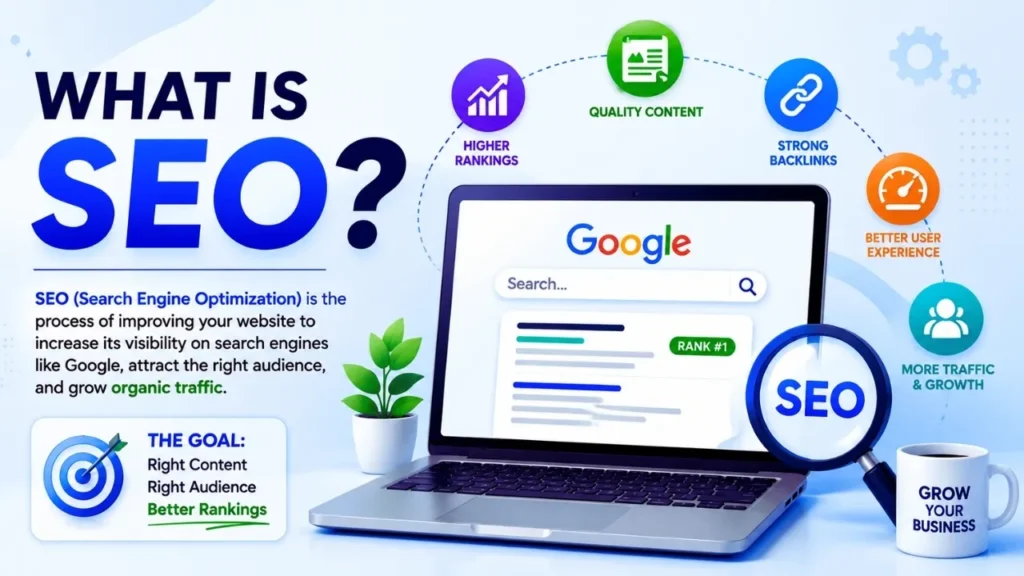
SEO, or Search Engine Optimization, is a process of improving a website and its content to increase their visibility in search engine results. It helps search engines understand your web pages and assists users in finding relevant information. Effective SEO can improve search engine rankings, attract organic traffic, boost online visibility, and contribute to the long-term growth of the website.
What is SEO?
The first question that naturally arises is: what exactly is SEO? SEO stands for ‘Search Engine Optimization.’ It is a process of improving a website, its content, and its overall user experience so that search engines can better understand its pages and present them to users searching for relevant information.
For more information, see Google’s SEO Starter Guide.
Simply put, SEO helps visitors easily find your website through ‘unpaid’ or ‘organic’ search results.
For example, suppose you publish an article titled “How to Start a Blog for Beginners.” There may be thousands of websites on the internet featuring blogging-related content. However, if your article is well-researched, informative, user-friendly, technically sound, and closely aligned with what users are looking for, it has a strong chance of appearing in relevant search results, allowing Google to show it to the right audience.
SEO does not guarantee that a page will reach the very top spot (position #1) in search results. Search rankings depend on numerous factors, such as relevance, content quality, competition, website accessibility, authority (or trustworthiness), and the page’s overall utility.
Meaning and Definition of SEO
The primary objective of SEO is to enhance a website’s visibility on search engines and deliver its content to the right audience.
SEO involves a series of interconnected activities, including:
- Researching the topics and keywords people actually search for
- Understanding search intent
- Creating useful and original content
- Optimizing titles, headings, URLs, images, and other page elements
- Improving website speed and mobile usability
- Establishing a logical internal linking structure
- Acquiring relevant and trustworthy backlinks
- Ensuring search engines can crawl and index important pages
- Monitoring search performance and improving content over time
Consider a small website that publishes articles on digital marketing. Instead of writing a generic article titled “Digital Marketing Tips,” a website owner could research what beginners are looking for and create a comprehensive guide such as “Digital Marketing for Beginners: Types, Benefits, Strategies, and Examples.”
The second approach provides the reader with a clear understanding and allows the author to answer specific questions within a single, valuable resource.
Practical Tip: Before writing an SEO article, search using your target keyword and carefully analyze the pages currently ranking. Observe the questions they answer, the topics they discuss, and any information they might have missed. Do not copy them exactly; instead, use your research to create something more effective and comprehensive.
How SEO Helps Websites Gain Organic Traffic
‘Organic traffic’ refers to visitors who arrive at your website through search results without any paid advertising.
Suppose someone searches for “how to compress images online” on Google. If your website has an effective, well-structured page that answers this question, Google might display your page in the search results. When a user clicks that link, you receive organic traffic.
One of the major benefits of SEO is this: you can attract regular visitors without paying for each individual click.
However, generating organic traffic involves more than just repeatedly using a keyword. You need to help search engines understand what your page is about and whether it provides a satisfactory answer to the user’s query.
An effective SEO process typically looks like this:
Search Query → Relevant Content → Search Visibility → User Click → Organic Traffic
For example, if you run a tech blog for beginners and publish a detailed guide on ‘Google Search Console,’ you can optimize the article based on various relevant questions—such as how to set it up, how to inspect URLs, how to identify indexing issues, and how to monitor search performance. When a page gains visibility for relevant searches, it can attract visitors not just from a single specific keyword, but from a variety of related search queries.
Practical Tip: Do not optimize each article based solely on one specific keyword. Instead, build the article around a core topic while naturally incorporating closely related questions, terminology, examples, and user pain points.
SEO involves several connected activities, including keyword research, creating useful content, optimizing website pages, and improving the technical foundation of your site. If you are new to keyword research, our guide on how to find low competition keywords in 2026 can help you identify realistic topics to target.
Why SEO is Important for Websites
SEO is crucial because simply having a website isn’t enough; people need to be able to find it.
A well-executed SEO strategy can help a website in the following ways:
- Increasing visibility in search results
- Attracting relevant organic traffic
- Reaching people who are actively seeking solutions
- Building credibility through useful and reliable content
- Reducing reliance on paid advertising
- Generating long-term traffic
Helping achieve business goals such as generating leads (potential customers), driving sales, securing subscriptions, and more
For instance, a freelance WordPress service provider could publish helpful guides on topics like website speed, WordPress security, plugin selection, and website maintenance. These articles can attract individuals who are looking for solutions to these specific issues. If the website demonstrates genuine expertise and provides clear information about its services, some of these visitors may eventually convert into paying customers.
While SEO certainly helps build trust and credibility, it is a mistake to assume that a website automatically becomes trustworthy simply by ranking well on search engines. A high-quality website should clearly identify content creators, provide accurate information, cite reliable sources where necessary, keep important information up-to-date, and offer transparent ways for readers to easily contact the business or the author. The best approach is to consider SEO from the reader’s perspective first.
Ask yourself:
“If someone finds this page via Google, will it truly solve their problem?”
If the answer is ‘yes,’ then you have a very strong foundation for sustainable SEO.
Expert Tip:
Solve the problem behind the search — the ranking will follow, not the other way around. Pick keywords that genuinely fit what you’re writing about, make sure your content lines up with what the searcher is actually looking for, show that you know the subject well, and never sacrifice accuracy for the sake of filling space. On the technical and structural side, keep your site organized, link related pages together sensibly, make sure it loads quickly, and back up your claims with credible sources. And don’t set it and forget it — check Google Search Console on a regular basis, and let the real search data guide what you fix and improve next.
How does SEO work?
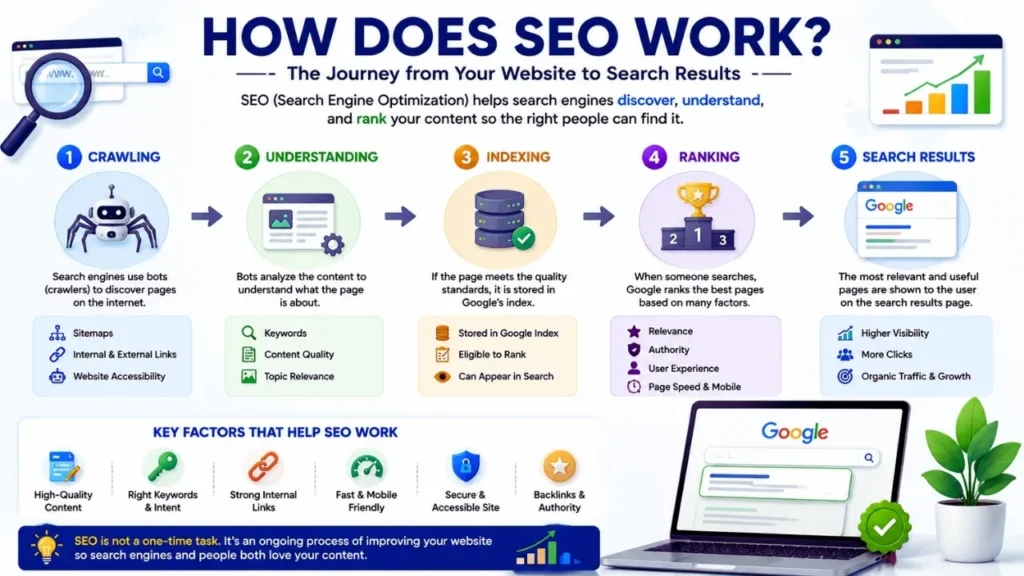
SEO helps search engines discover your website, understand the content of each page, and determine which pages are most relevant to a specific search query. While the process might seem complex from the outside, the core concept is quite simple:
Discover → Understand → Rank → Show
When someone searches for something on Google, the search engine doesn’t just look for the specific words typed into the search box. Instead, it aims to display results that are relevant, useful, user-friendly, and aligned with the searcher’s needs.
Understanding these three steps allows you to make better SEO decisions without relying on outdated or obsolete strategies.
How search engines discover web pages
Before a page can appear in search results, the search engine must first discover it or become aware of its existence. Search engines use automated programs—commonly known as “crawlers” or “Googlebot”—to discover and access web pages.
Crawlers can discover URLs through various sources, such as links from other pages, internal links, sitemaps, and previously known URLs.
For example, suppose you publish a new article titled “How to Start a WordPress Blog.” If your website’s homepage, blog category page, or another relevant article links to this new post, search engine crawlers can follow those links to discover the new URL.
For larger websites, an XML sitemap can help signal to search engines which URLs you consider important.
However, discovering a URL does not automatically mean Google will index or rank it.
Your website must also be technically accessible to search engines. Issues such as accidentally including a ‘noindex’ directive, blocking crawls, broken links, server errors, or poor site architecture can make it difficult for search engines to access important pages.
Actionable tips:
- Create and submit an XML sitemap via Google Search Console.
- Use descriptive internal links between related articles.
- Test important URLs using Google’s ‘URL Inspection‘ tool.
- Fix broken links and unnecessary redirect chains.
- Ensure that important pages are not accidentally marked as ‘noindex’.
- Design the website structure to be easily navigable for both users and crawlers.
How search engines understand content
After discovering a page, search engines need to understand its content and purpose.
They analyze various elements of a web page, including text, headings, page titles, links, images, structured data, and the site’s overall context. Search engines attempt to grasp the underlying meaning of a search query rather than relying solely on exact keyword matches.
For instance, if someone searches for the “best way to reduce image file size,” they are likely looking for effective methods for image compression or resizing. Therefore, a high-quality page should cover compression techniques, recommended formats, image quality considerations, and—if possible—provide a step-by-step demonstration of the entire process.
Simply repeating the phrase “image compression” over and over will not make the page relevant.
This is why understanding ‘search intent’—the user’s underlying goal—is crucial.
Your content should clearly outline:
- The topic being discussed
- The target audience
- The questions answered or problems solved
- The type of information or solutions provided
- How the various sections relate to the main topic
Clear headings help both readers and search engines understand the structure of your content.
For example:
H1: How to compress images online
H2: Why image compression is important
H2: How to reduce image size
H2: Best image formats for websites
H2: Common mistakes in image compression
This type of structure makes the page easy to scan and clarifies the specific purpose of each section.
Pro tip: Instead of trying to hit a specific ‘keyword density’ target, write your page based on the user’s query. Use relevant terms naturally whenever necessary to explain the subject matter.
Before a search engine can rank your content, it needs to discover and understand your pages. If Google is not finding or indexing your important URLs, learn about the common reasons Google is not indexing your pages and how to fix them.
How search engines determine page rankings
Once a search engine discovers a page and understands its content, it must decide where to place that page within the search results.
Google employs automated ranking systems that consider numerous factors—or ‘signals’—to identify the most helpful and relevant results for a specific query. There is no single ranking factor that guarantees the top spot. For example, imagine two websites publishing articles targeting the topic “technical SEO checklist.” Both might use the same primary keyword, but one article could offer more detailed explanations, a clear structure, real-world examples, effective internal navigation, and an overall superior user experience.
That page is more likely to outperform the competition because it better satisfies user needs.
Relevant factors include content quality and relevance, links, page experience, mobile usability, search engine accessibility, and the specific context of the search itself.
It is also important to remember that rankings can fluctuate based on the search query, location, language, device, and other situational factors.
Practical advice: Do not focus solely on reaching the number one spot. Instead, improve the page’s quality by considering the following questions:
- Does it answer the searcher’s core question? Is the information accurate and genuinely useful?
- Does it offer something better or more informative than just a basic definition?
- Is the page easy to read and navigate?
- Can search engines crawl and understand it?
- Does the website demonstrate appropriate expertise and trustworthiness?
SEO works best as a long-term process. You create a useful page, make it accessible and understandable, monitor its performance, and refine it based on actual user needs and search data.
Why is SEO Important?
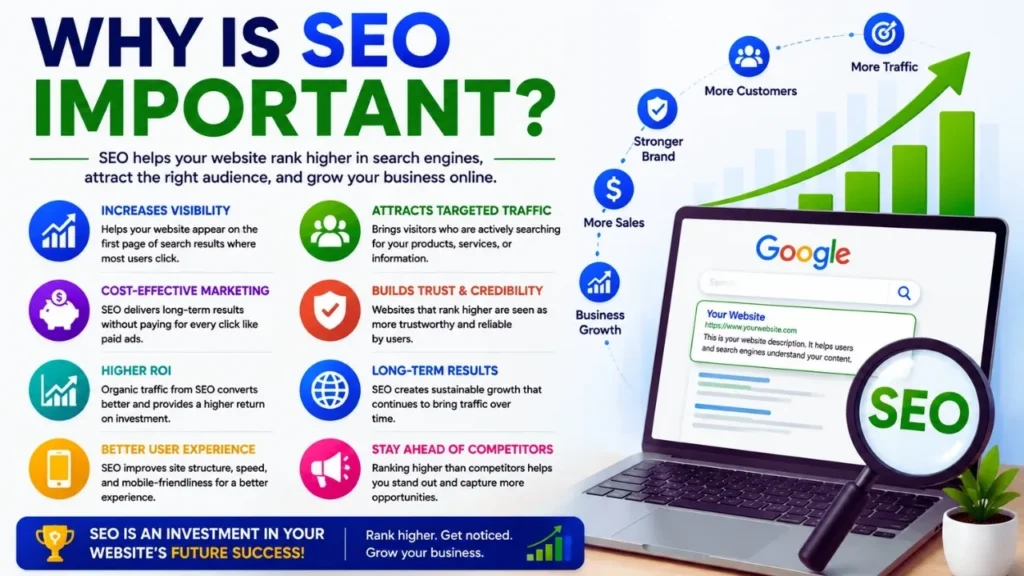
Simply having a website does not guarantee that people will find it on their own. You might be publishing informative articles, offering useful services, or selling excellent products—but without visibility or a presence on search engines, potential customers may never discover you. This is precisely where the importance of SEO lies.
A well-planned SEO strategy connects your website with people who are actively searching for the content, solutions, products, or services you offer. Unlike short-term promotional tactics, SEO can yield long-term benefits well after a page has been published.
Increasing Organic Traffic
One of the major advantages of SEO is its ability to attract organic traffic (visitors arriving naturally or for free) from search engines without incurring a cost for each individual visit.
For instance, suppose you run a blogging website and publish a comprehensive guide targeting the search query or keyword “how to start a blog.” If the page ranks well for relevant searches, people looking for information on starting a blog will easily find it.
This differs from paid advertising. With paid ads, traffic usually stops flowing as soon as you stop paying. In contrast, a high-performing organic page can continue to attract visitors for months or even years—though rankings and traffic volumes may fluctuate over time.
However, merely increasing the volume of traffic is not enough; the primary goal should be to attract *relevant* traffic.
For example, visitors searching for “WordPress website design services” are far more valuable to a WordPress service provider’s website than thousands of visitors searching for entertainment or unrelated topics. Actionable Tip: When creating each page, focus on the specific audience and their ‘search intent.’ Use Google Search Console to identify the queries driving impressions and clicks. Then, optimize the pages that have the potential to perform well but are currently underperforming.
Increasing Online Visibility
SEO helps showcase your website to people when they search for topics related to your business or content.
Consider the example of a freelance web designer. If their website consists solely of a homepage stating “We Build Websites,” competing for meaningful or significant search queries can be difficult. However, if the site publishes useful content covering topics such as WordPress development, website speed, mobile-friendly design, maintenance, and common WordPress issues, the chances of appearing in relevant search results increase significantly.
This extensive visibility can help establish a website as an authority on a specific subject.
Visibility through SEO is not limited to just the traditional blue search links. Depending on the user’s query, Google may display ‘featured snippets,’ image results, local results, videos, news, or other search features.
Pro tip: Instead of publishing isolated or scattered articles, create content centered around related themes or topics. Build a strong ‘pillar page’ (a core page covering a main topic) and link it to supporting content via relevant internal links.
Building Credibility and Reliability
SEO can help boost a website’s credibility by assisting users in finding essential, well-organized, and transparent information.
For instance, a tech website publishing a guide on website security should explain the topic accurately, avoid exaggerated claims, identify the author or organization where appropriate, and cite reliable sources when presenting key information or claims.
This is particularly crucial for topics where misinformation could cause significant harm.
Simply ranking high in search results does not automatically generate credibility. Instead, your content and the way information is presented need to demonstrate qualities such as experience, expertise, authoritativeness, and reliability.
Beneficial elements may include:
- Clear author identification
- Accurate and up-to-date content
- Original examples or practical experience
- Reliable external references
- Transparent contact information
- Clear policies and disclosures
- Accurate information about products or services
Pro tip: Regularly review your key pages. Remove unsubstantiated claims, update outdated information, add links to reliable sources where appropriate, and clearly indicate who is responsible for the content.
Achieving Long-Term Results
SEO is generally not a marketing strategy that yields overnight results; rather, it is a long-term investment.
Building visibility for a new website, establishing authority or credibility, acquiring links, and maintaining consistent content quality takes time. While some pages may start attracting search traffic relatively quickly, highly competitive topics can require a much longer period.
The long-term benefit is that a successful page continues to attract relevant visitors without incurring a cost for every click.
For instance, a detailed tutorial on ‘Google Search Console’ for beginners can attract visitors over an extended period, as new users constantly search for help regarding indexing, URL inspection, and search performance. Its utility can be sustained by keeping the article accurate and updating it when necessary.
This does not mean you should forget about an article once it is published. Search results shift, competitors publish new content, user expectations evolve, and information can become outdated.
A practical tip: view SEO as an ongoing process:
Create → Publish → Monitor → Improve → Update
Track organic clicks, impressions, rankings, and conversions as needed. Update content only when there is a genuine need for improvement, rather than altering a page simply to make it appear ‘new.’
In conclusion, SEO is crucial because it helps make your website discoverable, relevant, trustworthy, and sustainable. When SEO is combined with genuinely useful content and an excellent user experience, it can become one of the most powerful and enduring tools for boosting your online presence.
What are the main types of SEO?
SEO is not a single strategy; it is a combination of various methods that help search engines understand your website and assist users in finding and utilizing your content. The four key areas that beginners should understand are On-Page SEO, Off-Page SEO, Technical SEO, and Local SEO.
These areas often overlap. For instance, publishing a helpful article is part of On-Page SEO; ensuring Google can crawl that article falls under Technical SEO; and acquiring a relevant editorial link to it comes under Off-Page SEO.
On-Page SEO
On-Page SEO focuses on the elements of your website that you can directly control. Its primary objective is to make a page useful, relevant, understandable, and user-friendly for both visitors and search engines.
Common On-Page SEO elements include:
- Page titles
- Headings
- Primary and related keywords
- Search intent
- Content structure
- Internal links
- Image optimization
- URLs
- Meta descriptions
- Helpful examples and information
For example, suppose you are writing an article targeting the topic “how to start a blog.” A good On-Page approach would involve creating a clear title, explaining the process step-by-step, answering common questions beginners have, using descriptive headings, linking to related articles, and making the page easy to read.
The goal is not to repeat the phrase “how to start a blog” in every paragraph. Instead, create a page that genuinely satisfies the person searching for that topic. Actionable Tip: Before publishing, verify that your title accurately describes the page, the introduction answers the user’s core question, the headings create a logical structure, and relevant internal links help readers continue their research.
Off-Page SEO
Off-page SEO refers to activities that take place outside your website but contribute to boosting its reputation, visibility, and authority.
One of the most well-known aspects of off-page SEO is link building. When another relevant and trustworthy website naturally links to your content, that link helps search engines understand that your page is a valuable resource.
For example, suppose you publish original research on blogging trends. A reputable marketing website references your research in one of their articles and links to your study. This is a far more meaningful backlink than dozens of irrelevant links from low-quality websites.
Off-page SEO can encompass brand mentions, digital PR, partnerships, expert contributions, and genuine community engagement.
However, beginners should avoid purchasing large numbers of low-quality backlinks or participating in manipulative link-building schemes. The goal should be to earn recognition, not to manufacture it.
Actionable Tip: Create original resources or content that gives others a reason to reference or cite you. Research papers, comprehensive guides, useful tools, expert insights, and truly valuable tutorials can naturally attract attention and links.
Technical SEO
Technical SEO focuses on the technical foundation that helps search engines efficiently crawl, understand, and potentially index your website.
Key areas include:
- Website crawlability
- Indexing
- XML sitemaps
- HTTPS
- Mobile usability
- Site architecture
- Page speed and performance
- Canonical URLs
- Redirects
- Structured data
- Broken links
- Duplicate content management
For instance, you might publish an excellent article, but if the page inadvertently contains a ‘no-index’ directive, search engines might not include it in their index. Similarly, a confusing site structure can make it difficult for both users and crawlers to locate important pages.
You do not need to be a developer to handle technical SEO. Many common issues can be identified using tools like Google Search Console and website auditing tools.
Actionable tips: Regularly check your important URLs, submit your sitemap via Google Search Console, resolve critical crawl or indexing issues, maintain HTTPS, and ensure your website functions correctly on mobile devices.
Technical SEO focuses on making your website easier for search engines to crawl, understand, and index. For a practical checklist, see our complete technical SEO checklist for bloggers in 2026.
Local SEO
Local SEO focuses on increasing search visibility related to a specific location.
It is particularly beneficial for businesses such as restaurants, salons, repair services, clinics, agencies, local retailers, and professional service providers.
For example, the intent of someone searching for “digital marketing agency near me” differs from that of someone searching for “what is digital marketing.” Local SEO helps businesses compete in location-based searches, where proximity and local relevance are crucial. Key local SEO activities include maintaining an accurate Google Business Profile, ensuring business information consistency, gathering genuine customer reviews, creating useful local content, and verifying the accuracy of your name, address, and phone number wherever applicable.
Actionable tips: Claim and maintain your Google Business Profile, keep your business details up to date, respond to reviews professionally, add relevant business information, and create location-specific pages only when they offer genuine value.
Local SEO is especially important for businesses that serve customers in specific geographic areas. If you run a local business, our guide to building a winning local SEO strategy can help you understand the fundamentals.
How these types of SEO work together
The most powerful SEO strategies do not treat these four areas as completely separate entities.
On-page SEO makes your content useful and relevant.
Technical SEO makes the website accessible and understandable.
Off-page SEO helps build reputation and authority.
Local SEO increases visibility for location-based searches.
For a successful website, work on all four areas according to your goals rather than trying to optimize everything at once.
How to Get Started with SEO as a Beginner
Getting started with SEO can seem daunting or complex due to the multitude of strategies, tools, and terminology involved. However, the good news is that beginners do not need to master everything at once. An effective SEO strategy begins with understanding your audience; this is followed by creating genuinely useful content and gradually improving your website’s technical aspects and authority.
Find Relevant Keywords
Keyword research helps you understand what people are searching for and the type of information they are looking to find.
Start by selecting a broad topic related to your website. For instance, a digital marketing blog aimed at beginners might choose “SEO for beginners” as its core topic. From there, you can identify more specific sub-topics or questions, such as “What is SEO,” “How does SEO work,” or “How to do SEO for a new website.”
Do not select keywords based solely on search volume. Also, consider search intent (the user’s goal behind the search), relevance, competition, and whether the topic is truly suitable for your audience.
Pro Tip: Use tools like Google Search, Google Trends, Google Keyword Planner, and Google Search Console to discover topics and questions. Observe the questions people are asking and create content that addresses their actual needs.
Create Useful Content
Once you understand what searchers are looking for, create content that provides clear and effective answers to their questions.
For example, if your core topic is “how to build a website,” do not simply write a 500-word article that repeatedly uses the keyword. Instead, explain the entire process, discuss key points, provide examples, highlight common mistakes, and offer practical advice on the next steps for your readers.
Quality content should reflect sound knowledge and, whenever possible, incorporate personal experience. When recommending a tool, avoid making exaggerated claims; instead, explain why you are recommending it and mention its limitations.
Pro tip: Ask yourself before publishing content: “If I were the reader, would this page fully answer my questions?” If any important questions remain unanswered, improve the article’s quality before publishing.
Optimize your web pages
On-page SEO helps search engines and visitors understand what each page is actually about.
Start with a descriptive title and URL for the page. Use a clear H1 tag and organize the content using relevant H2 and H3 headings. Use your primary keyword naturally, while also incorporating other relevant terms or phrases that genuinely help convey the subject matter.
Optimize images by using descriptive file names and ‘alt text’ where appropriate. Include relevant internal links and write an effective meta description that accurately reflects the page’s content.
Avoid keyword stuffing. Search engines do not require unnatural keyword repetition to understand high-quality content.
Pro tip: Read your article aloud. If any keyword or sentence sounds artificial or forced, rewrite it to make it flow better for the reader.
Improve website speed and the mobile user experience
A website should be easy to use on both desktop and mobile devices. Slow loading times, annoying or unwanted elements, complex navigation, or disorganized content can frustrate users.
For example, a page containing multiple large, uncompressed images may take a long time to load, especially on slow mobile connections. Use appropriately sized images, remove unnecessary scripts and plugins, implement suitable caching mechanisms, and test key pages on mobile devices.
Pro tip: Use Google PageSpeed Insights and Google Search Console to identify performance and user experience issues. Focus on meaningful improvements rather than chasing a perfect score.
Create internal links
Internal links connect one page of your website to another. They help readers find relevant information and provide search engines with additional context regarding the relationships between your pages.
For example, an article titled “What Is SEO?” could naturally link to guides covering topics such as keyword research, technical SEO, on-page SEO, backlinks, and search intent.
Use descriptive anchor text that informs readers about the type of information or content they will see upon clicking the link.
Pro tip: Whenever you publish a new article, look for relevant pages within your existing content that naturally connect to the new article.
Acquire Quality Backlinks
A backlink is a link pointing to your website from another website. Links acquired based on relevance and quality can help boost your site’s visibility and reputation.
For beginners, the best way to earn backlinks is to create content that is truly noteworthy or worthy of being cited as a reference. This could include original research, useful free tools, detailed tutorials, data-driven articles, expert opinions, or comprehensive resources.
Avoid buying large numbers of backlinks at once or using automated link-building methods. Low-quality links offer no real benefit and can actually pose risks.
Pro Tip: Promote your best resources or content to relevant websites, journalists, communities, and industry contacts—especially where there is a logical reason for your work to be used as a reference.
Monitor SEO Performance
SEO work doesn’t end simply by hitting the ‘Publish’ button. Keep an eye on the results and make data-driven decisions about where improvements are needed.
Google Search Console can show you which search queries are generating impressions and clicks, which pages are attracting search traffic, and where there might be indexing issues.
For instance, if an article receives many impressions but few clicks, you might experiment with using a clearer title and meta description. If visitors click through but don’t engage much with the content, check whether the page actually meets the user’s search intent.
Pro Tip: Regularly review key pages and track metrics such as organic clicks, impressions, relevant rankings, indexing status, and conversions where applicable. The most sustainable SEO process for beginners is quite simple:
Research → Create → Optimize → Publish → Monitor → Improve
You do not need hundreds of strategies. By consistently adhering to the fundamentals, a new website can build a very strong foundation for long-term organic growth.
.
Key Factors in SEO Ranking
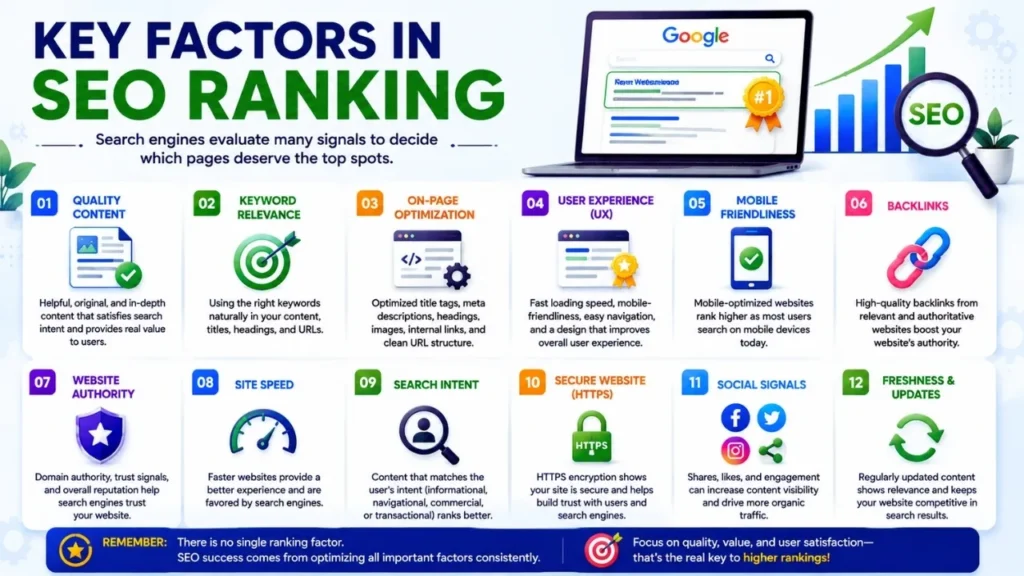
There is no single factor that guarantees a page will reach the top of Google. Search engines use automated systems to evaluate various signals; through these, they determine which results are most relevant and useful for a specific search query. For beginners, it is more productive to focus on the overall quality of the page rather than chasing after various ranking “tactics” or “tricks.”
Useful and Relevant Content
Content is a crucial component of a successful SEO strategy. A page should contain essential information that directly addresses the core topic and encourages readers to spend more time engaging with the material.
For instance, if someone searches for “how to start a blog,” a high-quality article should clearly explain the entire process. It needs to provide a practical description of steps such as choosing a domain and hosting, the initial setup, and other necessary actions. An article that merely defines blogging or repetitively uses the same keyword fails to satisfy readers.
Useful content must be accurate, original, well-structured, and tailored to the target audience. Wherever relevant, share your direct experiences, explain how you arrived at specific recommendations or conclusions, and back up important claims with information from reliable sources.
Practical Tip: Before publishing the article, ask yourself—what would a beginner want to know about this topic? Incorporate explanations, examples, screenshots, or actionable steps that genuinely enhance the quality of the page.
Search Intent
“Search intent” refers to the reason why a person is searching for a specific topic. Understanding this intent allows you to create content that aligns with what users are actually looking for.
Consider a search query like “best keyword research tools.” The person searching is likely comparing various tools; Therefore, a comparative discussion of various products or tools might be more effective here than a generic definition of keyword research.
Search intent can generally be categorized into a few types:
- Informational: Seeking specific information or answers to questions.
- Navigational: Trying to locate a specific website or page.
- Commercial: Researching products or services before making a decision.
- Transactional: Being ready to take action (such as making a purchase or signing up).
If your content does not align with the primary search intent, achieving a high ranking can be difficult, even if the article itself is of excellent quality.
Practical Tip: Before writing, search using your target keyword or topic. Observe the types of pages that appear in the results and try to understand what kind of information users are expecting. Determine the style and depth of your article based on that research.
Page Experience
‘Page experience’ refers to how easily visitors can use and interact with your webpage. Even a technically optimized page can perform poorly if it is difficult to navigate. Common issues include intrusive pop-ups, confusing layouts, small font sizes, lack of mobile-friendliness, and unexpected content shifts while loading.
For instance, a cooking recipe website might feature excellent content, but if a visitor cannot easily read the ingredients or follow the instructions on a smartphone, the experience becomes frustrating.
A good page experience supports both usability and accessibility.
Practical Tip: Open your important pages on both mobile phones and desktop computers. Check the navigation, font size, spacing, buttons, menus, advertisements, pop-ups, and whether the main content is immediately accessible.
Website Performance
Website performance affects how quickly visitors can access and interact with your content.
Large images, excessive JavaScript, misconfigured caching, unnecessary plugins, and slow hosting can all contribute to poor performance.
For instance, if a visitor clicks on an article from Google but has to wait several seconds for the main content to become usable, they might leave without reading it.
Google provides performance-related metrics through “Core Web Vitals,” which focus on aspects such as loading performance, responsiveness, and visual stability.
Practical tips: Compress images and resize them appropriately, minimize unnecessary scripts, use caching where needed, keep the number of plugins in check, and test your website using tools like Google PageSpeed Insights. Instead of obsessing over achieving a perfect score at any cost, focus on genuinely improving the website’s usability.
Backlinks and Authority
Backlinks are links pointing to your page from other websites. Relevant, editorially earned links help search engines understand that other sites consider your content useful or worthy of citation.
For example, suppose you publish an original research report on blogging trends. A reputable marketing publication discovers the report and links to it as a source. This is a valuable backlink because it is both relevant and editorially earned.
However, not all backlinks are valuable. Buying large numbers of links, participating in manipulative link schemes, or acquiring links from irrelevant websites can create unnecessary risks.
Authority is built not just through the sheer number of backlinks, but also through the overall quality and reputation of your website.
Actionable advice: Create resources that serve as valuable references—such as original research, useful tools, detailed tutorials, expert insights, and comprehensive guides. Promote these to a relevant audience without resorting to manipulative link-building tactics.
Integrating Ranking Factors
View SEO as a holistic system rather than just a checklist of isolated signals:
Useful content + alignment with search intent + good user experience + strong technical performance + earned authority = a solid SEO foundation.
No single improvement guarantees a ranking. The real goal is to make every key page genuinely useful, technically accessible, reliable, and closely aligned with what your audience is looking for.
SEO vs. Paid Search: What’s the Difference?
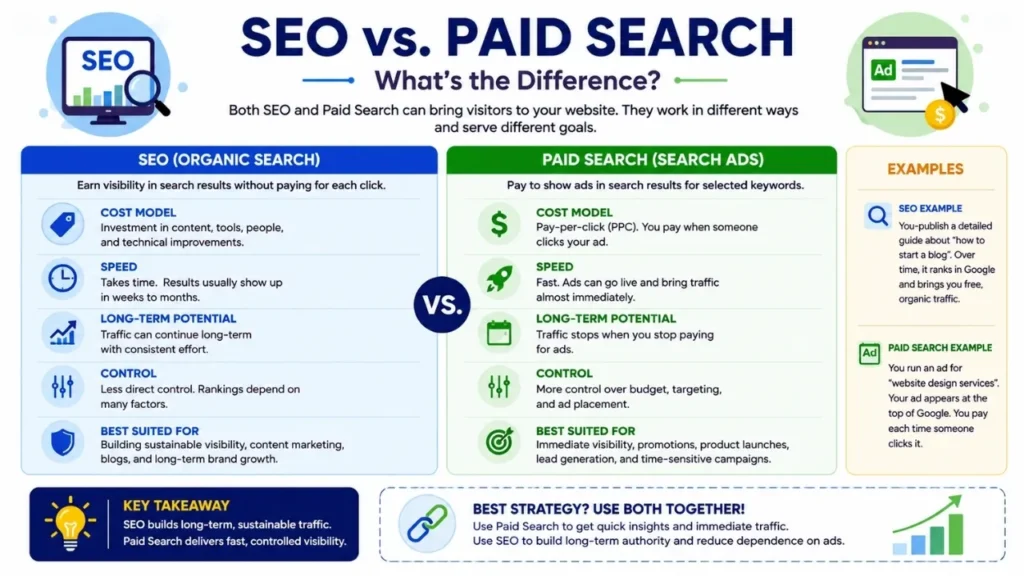
If you want people to find your website via Google, there are generally two main ways to achieve this: SEO (Search Engine Optimization) and paid search advertising. Both methods can drive visitors to your website, but they operate in completely different ways.
The primary goal of SEO is to gain visibility in organic search results by improving your website, content, and search relevance. On the other hand, paid search allows businesses to pay to display advertisements for specific search queries or keywords.
Understanding these differences helps you decide where to invest your time and marketing budget.
What is SEO?
SEO is the process of optimizing a website so that its pages appear in better positions or gain greater visibility within organic search results.
You do not have to pay Google for organic clicks. Instead, you focus on factors such as content quality, search intent, technical accessibility, internal linking, website experience, and authority or trustworthiness.
For example, suppose you run a website that teaches digital marketing to beginners. You publish a detailed, well-optimized article targeting the topic “What is digital marketing?” If the page gains organic visibility, people searching for this topic can find and visit your site—without you having to pay for each individual visit.
SEO generally requires patience. It can take time for a new website to build visibility, whereas established websites may often achieve good results more quickly.
What is Paid Search?
Paid search, often referred to as ‘search engine advertising,’ is a method that allows businesses to pay to display advertisements in response to relevant search queries.
For instance, a web design company could create ads targeting search queries such as “website design company” or “WordPress website developer.” Depending on the advertising model and campaign setup, the advertiser typically pays only when someone clicks on the ad.
Compared to SEO, paid search can generate visibility much faster; however, there is a cost associated with the traffic or visitors acquired through these ads.
If you stop the campaign, the visibility gained through paid search usually ceases as well.
SEO vs. Paid Search: Key Differences
| Feature | SEO | Paid Search |
|---|---|---|
| Traffic Type | Organic | Paid (acquired through payment) |
| Cost Model | Investment in content, tools, personnel, and technical work | Advertising budget |
| Speed | Generally slow | Generally fast |
| Long-term Potential | Traffic/visitors continue to arrive | Dependent on ongoing ad spend |
| Control | Less direct control over rankings | Greater control over targeting & budget |
| Testing | Takes longer to see meaningful results | Campaigns can be tested relatively quickly |
| Best For | Long-term organic visibility | Immediate or campaign-based visibility |
These two methods are not rivals; many businesses utilize both.
Which is better: SEO or Paid Search?
There is no single, universal winner.
SEO is a strong choice if the goal is to build long-term organic visibility, publish educational content, grow a blog, or reduce reliance on paid advertising over time.
On the other hand, Paid Search is preferable when you need immediate visibility, want to promote time-sensitive offers, wish to quickly gauge product demand, or have a specific advertising budget.
For instance, when a new e-commerce store launches a seasonal sale, it might use Paid Search to reach potential customers quickly while simultaneously creating SEO-friendly content to generate long-term traffic.
Similarly, a new blog might prioritize SEO; by publishing relevant and “evergreen” content, it is possible to generate search traffic for individual articles without needing a separate advertising budget for each one.
Can SEO and Paid Search be used together?
Absolutely. In many cases, combining them can yield better marketing insights and data.
Through Paid Search, you can quickly identify which keywords are driving clicks or conversions (sales or desired actions). You can then use this data to pinpoint topics that would be profitable to further optimize via SEO.
At the same time, organic search data can reveal important search queries that can be leveraged in future advertising campaigns.
For example:
Paid search → Keyword and audience analysis → Identifying potential opportunities → Creating SEO content → Increasing organic visibility
Through this approach, you can leverage short-term advertising data to build a long-term organic strategy.
Practical advice for beginners
If you have a limited budget and are building an information-focused website, start by establishing a strong SEO foundation:
- Identify relevant topics and search intent (the user’s goal behind the search).
- Create genuinely useful content.
- Naturally optimize key pages.
- Improve website speed and mobile usability.
- Create a logical internal linking structure.
- Monitor performance using Google Search Console.
- Consider paid search only when you have defined specific business goals and can ensure a measurable return on investment.
If you run a business where immediate leads or sales are critical, you might consider running small-scale, targeted paid campaigns alongside your ongoing investment in SEO.
The bottom line is that you shouldn’t choose SEO or paid search simply because the idea sounds appealing. Select the right approach based on your budget, goals, timeline, target audience, and business model. SEO is generally a strategy for building long-term visibility, whereas paid search is a controllable advertising medium that—when managed correctly—can ensure rapid promotion or exposure.
Common SEO Mistakes Beginners Should Avoid
Learning SEO isn’t just about knowing what to do; it is equally important to understand what can harm your website’s visibility, user experience, and credibility. Many beginners make easily avoidable mistakes because they focus too heavily on rankings and keywords rather than creating a truly useful website.
Below are five common SEO mistakes that should be avoided.
Keyword Stuffing
Keyword stuffing refers to the excessive or unnatural use of the same keyword in an attempt to influence search rankings.
For example, suppose an article is being written with “best SEO tools” as the target keyword. A beginner might write something like this:
“These are the best SEO tools. If you want the best SEO tools, use these best SEO tools, because the best SEO tools can improve your SEO.”
Writing like this feels awkward and annoying to read. Simply repeating a keyword does not automatically make a page more relevant.
Search engines have become much more adept at understanding content and context; therefore, you should focus on explaining the topic naturally.
Practical Tip: Use your main keyword where it fits naturally—such as in the title, main heading, introduction, URL, and relevant sections. Then, write naturally and include related terms only when they genuinely help explain the content.
Publishing Low-Quality Content
Publishing large amounts of shallow or mediocre content based on limited information can be problematic, especially when those pages fail to provide users with any new or original value. For instance, an article titled “How to Start Affiliate Marketing” that offers only a brief definition and a few generic tips won’t be very effective. In contrast, a comprehensive guide—covering topics like niche selection, finding affiliate programs, content creation, driving traffic, tracking results, and avoiding common pitfalls—would be far more valuable.
“Quality” doesn’t necessarily mean every article has to be extremely long. A 700-word article can be far more effective than a 3,000-word piece that merely repeats the same points.
The key factor is whether the content provides accurate, relevant, and meaningful information.
Practical tip: Before publishing content, ask yourself—does your article add useful information? Wherever appropriate, include real-world examples, your own observations, clear explanations, relevant data, screenshots, or personal experiences.
Ignoring Search Intent
Search intent refers to the underlying reason why a user is searching for something or asking a question. Ignoring this can lead to content that technically targets a keyword but fails to provide the actual answers or information people are looking for. For example, when someone searches for “best laptops under 50,000 Taka,” they are likely comparing different products. A 1,500-word essay explaining what a laptop is would not align with that intent.
Similarly, when someone searches for “how to fix an Android app crash,” they expect troubleshooting steps rather than a general explanation of what Android is.
Practical tip: Search for your target keyword before you start writing. Observe the types of pages that appear in the search results and identify the questions, formats, and level of detail that searchers expect. Next, create an improved and more effective version without copying the competitors’ pages.
Neglecting Technical SEO
Even if you create excellent content, you may face issues if search engines cannot properly access, crawl, or index your website.
Some common technical issues include:
- Accidentally enabled ‘noindex’ settings
- Ineffective or broken internal links
- Poor website structure
- Incorrect redirects
- Slow page loading speeds
- Mobile usability issues
- Duplicate URLs
- Sitemap-related problems
- HTTPS-related issues
For example, if a ‘noindex’ directive is mistakenly left on an important blog post, search engines might not include the article in their index, despite its high quality.
What to do: Use Google Search Console to regularly check for indexing and technical issues. Keep your sitemap updated, verify important URLs, fix broken links, maintain HTTPS, and ensure your website functions correctly on mobile devices.
Buying Low-Quality Backlinks
While backlinks can be beneficial, purchasing a large number of low-quality links is not a sustainable SEO strategy.
For instance, acquiring hundreds of links from irrelevant websites, automated directories, or sites created solely to sell links offers little real value; instead, it risks triggering search engines’ anti-spam policies against your website.
A better approach is to create resources or content that people naturally want to reference or cite—thereby earning relevant links organically.
You could publish original research, a useful calculator, a detailed tutorial, an industry study, or a comprehensive guide for beginners. Then, promote this content on relevant websites and communities where it will provide genuine value. What to do: Prioritize relevance and content quality (editorial value) over the sheer number of backlinks. Never assume that 500 low-quality links are better than a few genuinely relevant references.
Final advice for beginners
SEO works best when you focus on the fundamentals:
Useful content + alignment with search intent + proper technical SEO + natural optimization + genuine authority
Avoid shortcuts or easy fixes that promise quick rankings. Instead, build a website that readers can trust and search engines can easily understand. This approach might take a bit longer, but it establishes a robust foundation for sustainable organic traffic.
Best Free SEO Tools for Beginners
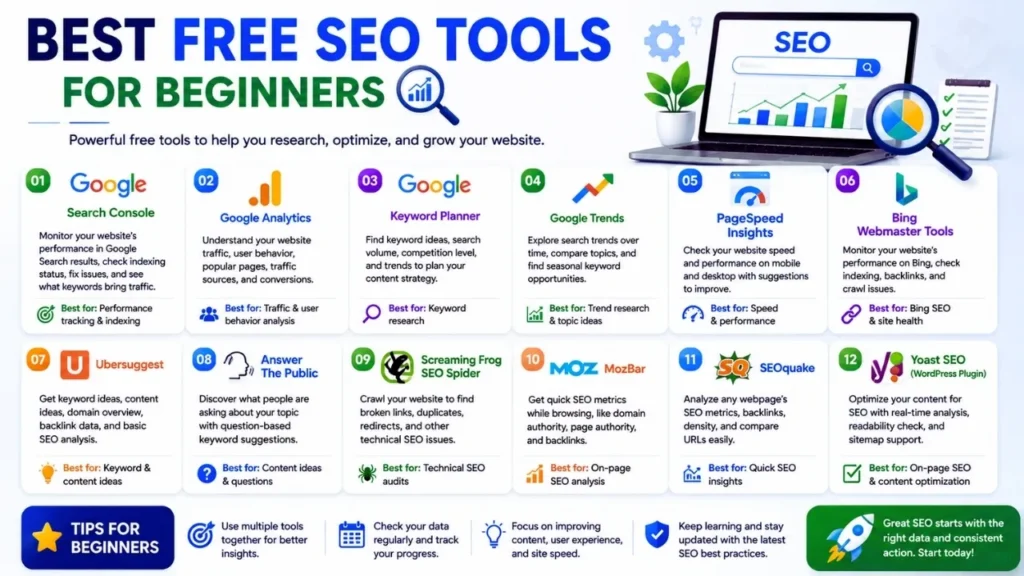
You do not need an expensive SEO subscription to start improving your website. Several free tools from Google can provide essential information regarding search visibility, website traffic, keyword ideas, and shifts in search interest. Four highly effective tools for beginners are Google Search Console, Google Analytics, Google Keyword Planner, and Google Trends.
The most important thing is not to amass a large number of tools, but rather to use a few reliable ones consistently and leverage the resulting data to make tangible improvements.
Google Search Console
Google Search Console is one of the most effective free tools for website owners and managers. It helps you understand how your site is performing in Google Search and assists in identifying critical indexing or technical issues.
Using Search Console, you can check the following:
- Search clicks and impressions (how often it was displayed)
- Search queries or phrases through which visitors arrive at your page
- Average search position
- Indexed and non-indexed pages
- Sitemap status
- URL inspection
- Search-related technical issues
- Core Web Vitals reports
For example, suppose an article you wrote on “how to find low-competition keywords” has been displayed 5,000 times (impressions) but has received very few clicks. This could be an opportunity to review the page title and description to ensure they accurately reflect the article’s core content or value. Search Console can also help you discover search queries for which your page is already appearing in search results—even if you hadn’t specifically targeted them.
Pro tip: Check Search Console at least once or twice a month. Look for pages that are generating impressions but receiving few clicks, identify new search queries, and investigate any critical indexing issues.
Google Analytics
Google Analytics helps you understand what visitors do after arriving at your website. While Search Console focuses primarily on performance within Google Search, Analytics provides more detailed information regarding website traffic and user behavior.
Using it, you can understand:
- Where visitors are coming from
- Which pages are receiving traffic
- How users interact with your site
- Engagement patterns
- Conversions (such as purchases or sign-ups) and key events
- Differences between traffic sources
For instance, Search Console can inform you that a specific article is generating organic clicks. Analytics can help you understand what visitors do after reaching that article—do they view other pages, sign up for something, or leave without taking any action?
Understanding this distinction is crucial. A page might attract significant traffic, yet contribute little toward achieving your actual business goals.
Pro tip: Instead of merely tracking traffic, set up meaningful ‘events’ or ‘conversions.’ For a blog, relevant actions might include newsletter sign-ups, filling out contact forms, downloading resources, or clicking on important links.
Google Keyword Planner
Although Google Keyword Planner was primarily designed for advertisers, it is also highly effective for generating keyword ideas and gauging search demand.
Searching for a broad topic like “digital marketing” can yield related keyword suggestions. These suggestions can help you identify subtopics that might interest your audience.
For example, instead of writing another generic article on digital marketing, keyword research could lead you to more specific topics—such as digital marketing strategies, digital marketing for small businesses, or digital marketing courses.
However, do not treat the figures shown in Keyword Planner as a guarantee of organic traffic. Advertising data and organic SEO performance are distinct; the level of competition displayed for ads does not necessarily reflect the difficulty of ranking organically.
Pro tip: Use Keyword Planner primarily as a tool for generating new ideas. Supplement its suggestions with insights from Google Search results, Search Console data, Google Trends, and your own understanding of your audience.
Free SEO tools can help you discover keywords, monitor search performance, and identify opportunities for improvement. For a broader collection of useful resources, check our 50+ free blogging resources and tools to grow your blog in 2026.
Google Trends
Google Trends helps you track how search interest in a topic changes over time and allows you to compare different topics or search terms.
For instance, you can compare “AI tools” and “SEO tools” to see how interest in them has shifted over a specific period. You can also analyze geographic or regional interest, related topics, and related search queries.
This can be particularly useful for content planning. If interest in a topic is rising, it might be wise to prioritize it or create content around it before the competition becomes too intense.
However, Trends does not provide specific forecasts regarding website traffic. Its data should primarily be used to understand relative search interest and trends; an upward trend does not automatically guarantee a massive influx of visitors.
Practical Tip: Before working on a time-sensitive topic, check its trend history. Observe seasonal patterns and compare related keywords rather than judging demand based on a single data point. How to use these tools together:
These four tools become far more effective when used as an integrated system:
Google Trends → Identifying rising or trending topics
Keyword Planner → Finding relevant keyword ideas
Search Console → Monitoring performance on Google Search
Google Analytics → Understanding visitor behavior on your site
For example, you can use Google Trends to identify a new or emerging topic, expand your keyword list or ideas with Keyword Planner, monitor the search performance of published articles via Search Console, and use Analytics to see if that traffic is contributing to achieving key website goals. For beginners, this simple workflow is far more effective than constantly switching between expensive SEO platforms. Use reliable data, validate your ideas, and improve your content based on the actual needs of your audience.
How long does it take to get SEO results?
One of the most common questions beginners ask is, “How long does SEO take to work?” There is no fixed answer because SEO results depend on factors such as website age, competition, content quality, technical health, backlinks, search demand, and how consistently the site is improved.
A new website targeting low-competition topics may start receiving impressions and occasional clicks within a few weeks or months. However, competitive keywords can take considerably longer to gain meaningful visibility. Some pages may perform quickly, while others may need several months of improvement before they attract consistent organic traffic.
For example, imagine a new technology blog publishes an in-depth article targeting “what is SEO.” The page may initially receive very few impressions because the website has little search history or authority. Over time, as the site publishes related content, improves internal linking, earns relevant references, and demonstrates consistent quality, the page may become more competitive.
SEO should therefore be viewed as a long-term process rather than a quick traffic hack.
A practical timeline might look like this:
| Period | What You May Focus On |
| First 1–3 months | Technical setup, keyword research, content creation, indexing |
| 3–6 months | Improving existing content, internal links, search visibility |
| 6–12 months | Building authority, expanding successful topics, improving rankings |
| 12+ months | Updating content, strengthening topical authority, scaling what works |
These are only general expectations, not guarantees. A website can see results earlier or later depending on its circumstances.
Actionable advice: Do not judge an SEO strategy after publishing only a few articles. Track impressions, clicks, rankings, indexed pages, and conversions over time. When a page receives impressions but few clicks, review its title and search intent. When it ranks but does not attract meaningful visitors, improve the content rather than simply adding more keywords.
SEO Best Practices for 2026
SEO continues to evolve, but the fundamentals remain focused on helping users find reliable and useful information. In 2026, beginners should avoid chasing every new SEO trend and instead build a strong foundation around quality, relevance, accessibility, and trust.
Focus on Search Intent
Before creating content, understand what the searcher actually wants.
If someone searches “best free keyword research tools,” they probably want a comparison or list of tools. If they search “what is keyword research,” they are looking for an explanation.
Tip: Search your target query before writing and examine the type of content Google is currently showing.
Create First-Hand, Useful Content
Generic information is easy to find. Add value through practical examples, original observations, screenshots, testing, comparisons, case studies, or explanations based on genuine experience.
For example, instead of simply saying that an SEO tool is “easy to use,” explain what you tested, what worked well, what limitations you noticed, and which type of user would benefit from it.
This makes your content more useful and supports stronger experience and trust signals.
Keep Content Accurate and Updated
Do not publish an article and forget about it. Technology, software features, search behavior, and SEO recommendations can change.
Review important articles periodically. Replace outdated information, update screenshots, verify statistics, and remove recommendations that are no longer appropriate.
Strengthen Internal Linking
Connect related pages naturally. A beginner’s SEO guide can link to dedicated articles about keyword research, technical SEO, backlinks, search intent, and on-page SEO.
This helps visitors discover related information and creates a clearer website structure.
Improve Technical Quality
Ensure that important pages are being crawled and indexed. Maintain HTTPS, use a logical URL structure, fix broken links, provide an XML sitemap, and ensure your website works properly on mobile devices.
Also pay attention to page performance and Core Web Vitals, but do not sacrifice useful content simply to chase a perfect performance score.
SEO usually takes time, especially for new websites. While waiting for organic visibility to grow, you can use practical free ways to drive traffic to your blog to diversify your traffic sources.
Earn Relevant Authority
Build authority through genuinely useful resources, original research, expert contributions, digital PR, and relationships within your industry. Avoid shortcuts such as buying large quantities of low-quality backlinks.
Measure and Improve
Use tools such as Google Search Console and Google Analytics to understand what is actually happening.
A simple 2026 SEO workflow is:
Research → Create → Optimize → Publish → Measure → Improve → Update
The most effective SEO strategy is not necessarily the one with the most keywords, backlinks, or published articles. It is the one that consistently helps the right people find accurate, useful information while providing a reliable experience from search result to website.
Conclusion
Good SEO isn’t about stuffing a page with keywords and crossing your fingers that Google notices. At its core, it’s about building a website that’s easy to find, easy to navigate, easy to trust — and genuinely helpful to the people who land on it.
If you’re just starting out, don’t overcomplicate things. Figure out what your audience is actually typing into search bars, understand the reason behind those searches, and build content that answers those needs directly. Keep your optimization natural rather than forced, make sure your site runs smoothly on the technical side, and tie related pages together with sensible internal links. As things scale up, put your energy into earning real credibility — not chasing quick-fix link schemes that rarely hold up over time.
One thing worth accepting early: SEO doesn’t work on a fast clock. A brand-new site, or one competing in a crowded niche, often won’t see a traffic spike right away — and that’s normal. Rather than obsessing over rank changes day to day, lean on data. Tools like Google Search Console and Analytics can show you what’s actually happening, where the gaps are, and what to fix next.
But above everything else, write for the human being reading it — not the algorithm scanning it. A page that solves someone’s actual problem, gives them something usable, shows real knowledge of the subject, and feels good to read will naturally hold up better in search results over time than any trick ever could.
It doesn’t matter if you’re running a personal blog, growing a local business, offering services, or building out a knowledge hub — the SEO fundamentals apply the same way: make your site worth finding.
So keep it simple: start small, stay consistent, track your results, and refine as you go. That approach will always outperform hunting for a shortcut to page one.
Frequently Asked Questions (FAQs) :
Simply put, SEO is a process that makes a website easier for search engines to understand and more accessible to users. When Google properly “understands” your site, it can present your content to the right audience. In short, it is a strategy for increasing long-term visibility.
It isn’t entirely free, but you can start with very little cost. You don’t have to pay a direct fee to appear in Google search results, though expenses may arise from writing content, purchasing a domain and hosting, or using premium tools. However, it is possible to build a solid foundation using free tools initially.
Yes, they can, and it isn’t difficult to get started. First, understand how search engines work, then try to grasp the user’s search intent, and finally, move on to keyword research and content creation. Knowing how to code isn’t mandatory—though technical knowledge becomes increasingly useful as the site grows.
There is no fixed answer to this. Some sites might start getting a little traffic within a month or two, while others in highly competitive niches could take much longer. It depends on factors like content quality, the site’s age and authority, and its technical health. Therefore, the wise approach is to work consistently rather than rushing the process.
Yes, it is. While the medium of search is changing, people still actively search when they want to learn something or make a purchase. The need for high-quality, reliable, and useful content hasn’t diminished; rather, we must adapt to the evolving platforms.
It can be broadly categorized into four areas: On-Page SEO (content and structure within the page), Off-Page SEO (building credibility from external sources), Technical SEO (crawling, speed, and internal technical aspects), and Local SEO (reaching a local audience).
There is no single “magic factor.” Search engines evaluate multiple signals simultaneously to determine rankings. Therefore, instead of chasing one or two tricks, the most effective approach is to create content that is genuinely useful to users, maintain site speed and usability, and gradually build credibility.
It remains impactful, but the old notion that “the more links, the better” no longer applies. Quality and relevance are what matter now. Instead of relying on fake or purchased links, you should make your content valuable enough that others naturally want to link to it.
Google Search Console helps you understand site performance, Google Analytics provides data on visitor behavior, Keyword Planner assists in discovering new keywords, and Google Trends shows how search patterns evolve over time. Using these four tools together is sufficient for getting started.
You should be cautious. Google’s ranking system is so complex and dynamic that no one can guarantee a permanent #1 spot. SEO can enhance a site’s competitive strength, but guaranteeing a specific rank is not its function. Any such promise should be viewed with skepticism.

Sona Bera Kar
Founder of Toppez Digital.
I’m Sona Bera Kar, the founder of Toppez Digital and a digital marketing professional with over five years of experience in SEO, blogging, WordPress, AI tools, and affiliate marketing. Through Tech Terapias, I share practical, research-backed, and experience-based insights, guides, and advice on digital marketing and technology. My goal is to help bloggers, content creators, entrepreneurs, and business owners build better websites, improve their search visibility, and grow their online presence and businesses with confidence.